

USBC hubs are essential for expanding the connectivity of modern laptops and tablets, especially as many devices lack multiple ports. The best models offer a balance of speed, versatility, and build quality, but they also come with tradeoffs like size, power delivery, and port variety. The Belkin 100W Multiport Hub stands out for its high data transfer speeds and power capacity, while the Anker 555 offers a comprehensive set of features for demanding users. Choosing the right hub depends on your specific needs, whether it’s fast data, multiple ports, or compact size. Keep reading for a detailed breakdown of the top options and what makes each one unique.

Get school and study supplies delivered free — and shop member deals
- Fast, free delivery on millions of items
- Access to Prime Big Deal Days deals on October 6–7
- Prime Video, Amazon Music and more included
Key Takeaways
- High-power delivery and fast data transfer are often mutually exclusive in budget options.
- Multiport hubs with HDMI and SD card readers tend to be bulkier but offer greater versatility.
- Brand reputation and build quality significantly impact long-term reliability.
- Price varies greatly based on the number of ports and additional features like Ethernet or advanced charging.
- Most top-tier hubs balance port variety with compactness, but tradeoffs in size and performance exist.
| Acer 5-in-1 USB-C Hub with HDMI, 100W PD, and USB 3.0 Ports |  | Best Overall USB-C Hub for Versatile Connectivity | Ports: HDMI, USB-C PD, USB-C 3.0, USB-A 3.0, USB-A 2.0 | Video Output: 4K@60Hz HDMI | Power Delivery: 100W input / 90W output | VIEW ON AMAZON | See Our Full Breakdown |
| Belkin 100W 10Gbps Multiport USB-C Hub Adapter for Laptop, iPad, PC, & More |  | Best High-Speed Data and Power for Compact Use | Ports: 4 USB-C 3.2 Gen 2 ports | Transfer Speed: up to 10Gbps per port | Power Delivery: up to 100W | VIEW ON AMAZON | See Our Full Breakdown |
| Anker 555 USB-C Hub (8-in-1), Ethernet Adapter with 4K@60Hz HDMI |  | Best for Versatile Connectivity with Ethernet and 4K HDMI | Ports: HDMI, Ethernet, USB-C data, 2x USB-A, SD/microSD reader | Video Output: 4K@60Hz (DP 1.4) / 4K@30Hz (DP 1.2) | Data Transfer Speed: Up to 10 Gbps | VIEW ON AMAZON | See Our Full Breakdown |
| Anker 332 USB-C Hub 5-in-1 with 4K HDMI | 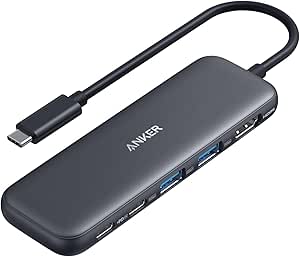 | Best Compact Hub for Basic 4K HDMI Output | Ports: 4K HDMI, USB-C data (5 Gbps), 2x USB-A (5 Gbps), USB-C 100W PD-IN | Max Video Output: 4K @ 30Hz | Pass-Through Charging: Up to 85W | VIEW ON AMAZON | See Our Full Breakdown |
| Acer USB C Hub 7-in-1 Multi-Port Adapter for Laptop and Mac Devices |  | Best for Multi-Device Versatility and Power Delivery | Ports: HDMI 4K@30Hz, 2 USB 3.1, USB-C, PD charging, MicroSD, SD | Max Power Delivery: 100W | Video Output: 4K@30Hz HDMI | VIEW ON AMAZON | See Our Full Breakdown |
| Acer 10 Gbps USB C Hub with 4 USB-C 3.2 Ports and 100W Power Delivery |  | Best for High-Speed Data and Charging | Data Transfer Speed: 10Gbps | Number of USB-C Ports: 4 | USB-C Version: 3.2 Gen 2 | VIEW ON AMAZON | See Our Full Breakdown |
| Anker 5-in-1 USB-C Hub with 4K HDMI and Power Delivery |  | Best for High-Quality Video and Laptop Charging | Ports: 2 USB-A 2.0, 1 USB-A 3.0, 1 HDMI, 1 USB-C PD | Power Delivery: 90W pass-through | Video Output: 4K at 30Hz | VIEW ON AMAZON | See Our Full Breakdown |
| Anker USB-C Hub, 7-in-1 Multi-Port USB Adapter with 4K@60Hz HDMI and 85W Charging |  | Best for High-Refresh-Rate Video and Versatility | HDMI: 4K@60Hz | Wattage: 85W charging | Number of Ports: 7 | VIEW ON AMAZON | See Our Full Breakdown |
| UGREEN 5-in-1 USB C Hub Multiport Adapter with 4K HDMI and 100W Power Delivery |  | Best for Broad Compatibility and Power | Ports: 4K HDMI, 1 USB-C PD 100W, 1 USB-A 3.0, 2 USB-A 2.0 | Maximum Resolution: 4K@30Hz | Compatibility: Windows, macOS, Linux | VIEW ON AMAZON | See Our Full Breakdown |
| UGREEN USB C Hub 4 Ports, USB 3.2 Data Transfer |  | Best for Simple Data Transfer on the Go | Number of Ports: 4 | Data Transfer Speed: 10Gbps | Size: 1.5 x 0.5 inches | VIEW ON AMAZON | See Our Full Breakdown |
| BENFEI 5-in-1 USB-C Hub with 4K HDMI, 100W Power Delivery, and 3 USB-A Ports |  | Best Overall for Versatility and Durability | Ports: 1x HDMI, 1x USB-C (power delivery), 3x USB-A | Max Video Output: 4K @ 30Hz | Max Charging: 100W (90W pass-through) | VIEW ON AMAZON | See Our Full Breakdown |
| USB C Hub 10-in-1 with 4K HDMI, SD/TF Card Reader, 100W PD Charging, USB 3.0 & 2.0 Ports for Laptops and Tablets |  | Best for Complete Connectivity in a Compact Package | Number of ports: 10 | HDMI resolution: 4K@60Hz | USB 3.0 ports: 2 | VIEW ON AMAZON | See Our Full Breakdown |
| Acer 6-in-1 USB C Hub 10Gbps, USB C to HDMI Adapter 4K@60Hz |  | Best for High-Speed Data and 4K Gaming/Work | Hardware Interface: HDMI, USB Type C | Additional Features: Fast Data Transfer, Plug and Play | Compatible Devices: MacBook, iPad Pro, Chromebooks, Surface | VIEW ON AMAZON | See Our Full Breakdown |
| Anker USB C Hub, 5-in-1 USB-C to HDMI Splitter with 4K Display |  | Best for Basic High-Resolution Video and Charging | Connectivity: 5-in-1 | HDMI: 4K@30Hz | USB-C Data Port: 5 Gbps | VIEW ON AMAZON | See Our Full Breakdown |
| usbc hub | Ports |
|---|---|
| Acer 5-in-1 USB-C Hub with HDM | HDMI, USB-C PD, USB-C 3.0, USB-A 3.0, USB-A 2.0 |
| Belkin 100W 10Gbps Multiport U | 4 USB-C 3.2 Gen 2 ports |
| Anker 555 USB-C Hub | HDMI, Ethernet, USB-C data, 2x USB-A, SD/microSD reader |
| Anker 332 USB-C Hub 5-in-1 wit | 4K HDMI, USB-C data (5 Gbps), 2x USB-A (5 Gbps), USB-C 100W PD-IN |
| Acer USB C Hub 7-in-1 Multi-Po | HDMI 4K@30Hz, 2 USB 3.1, USB-C, PD charging, MicroSD, SD |
| Acer 10 Gbps USB C Hub with 4 | — |
| Anker 5-in-1 USB-C Hub with 4K | 2 USB-A 2.0, 1 USB-A 3.0, 1 HDMI, 1 USB-C PD |
| Anker USB-C Hub | — |
| UGREEN 5-in-1 USB C Hub Multip | 4K HDMI, 1 USB-C PD 100W, 1 USB-A 3.0, 2 USB-A 2.0 |
| UGREEN USB C Hub 4 Ports | — |
| BENFEI 5-in-1 USB-C Hub with 4 | 1x HDMI, 1x USB-C (power delivery), 3x USB-A |
| USB C Hub 10-in-1 with 4K HDMI | — |
| Acer 6-in-1 USB C Hub 10Gbps | — |
| Anker USB C Hub | — |
More Details on Our Top Picks
Acer 5-in-1 USB-C Hub with HDMI, 100W PD, and USB 3.0 Ports
This Acer hub stands out for combining essential features into a slim, aluminum design, supporting true 4K@60Hz HDMI output that surpasses many 4K hubs limited to 30Hz, like the Anker 332. Its 100W pass-through charging ensures your laptop stays powered, though the power adapter isn’t included, which could be inconvenient for some users. Unlike the Belkin 10Gbps hub, it offers dedicated USB 2.0 ports, reducing interference and maintaining compatibility with peripherals. The requirement for full-featured USB-C ports means it may not work with older or less capable devices, but it remains a solid choice for users needing a reliable, all-in-one hub.
Pros:- Supports true 4K@60Hz HDMI output for smooth video performance
- 100W pass-through charging keeps devices powered
- Compact aluminum shell offers good heat dissipation
- Dedicated USB 2.0 port minimizes wireless interference
Cons:- Power adapter not included, requiring an additional purchase for full 90W charging
- Requires laptops with full USB-C feature support, limiting compatibility
Best for: Professionals who need 4K video output and reliable charging on Windows or MacBooks.
Not ideal for: Users with laptops that lack DisplayPort Alt Mode or those seeking a hub with more than five ports.
- Ports:HDMI, USB-C PD, USB-C 3.0, USB-A 3.0, USB-A 2.0
- Video Output:4K@60Hz HDMI
- Power Delivery:100W input / 90W output
- Data Transfer Rate:5 Gbps
- Enclosure Material:Aluminum
- Compatible OS:Windows, macOS, ChromeOS, Linux
Our verdict“This hub is ideal for users seeking a sleek, reliable all-in-one solution with high-quality video and charging capabilities.”
Belkin 100W 10Gbps Multiport USB-C Hub Adapter for Laptop, iPad, PC, & More
Compared with the Acer 5-in-1, the Belkin hub excels in data transfer speed, supporting 10Gbps per port across four USB-C 3.2 Gen 2 ports, making it ideal for transferring large files quickly. It offers 100W pass-through charging, matching the Acer’s power capabilities but in a more portable, minimal form factor. While it lacks dedicated video output ports, it makes up for this with its environmentally friendly build, using recycled materials. This focus on speed and durability makes it a smart pick for those who prioritize fast data transfer and eco-conscious design, though it isn’t suitable for users needing HDMI or multiple video outputs.
Pros:- Supports transfer speeds up to 10Gbps per port
- Supports 100W pass-through charging
- Compact design with recycled materials
- Universal compatibility with MacBook, iPad, PC, Chromebook
Cons:- Limited to four ports, less flexible for extensive setups
- Performance depends on host device capabilities
- Slightly bulkier than ultra-lightweight hubs
Best for: Creative professionals or power users needing quick data transfer and reliable charging on a compact device.
Not ideal for: Users requiring video output or multi-port audio/video connections, as it lacks HDMI or SD card slots.
- Ports:4 USB-C 3.2 Gen 2 ports
- Transfer Speed:up to 10Gbps per port
- Power Delivery:up to 100W
- Dimensions:1.6 in. x 3.0 in. x 0.6 in.
- Compatibility:USB-C iPad, MacBook, Chromebook, PC Laptop
- Warranty:2-year limited warranty
Our verdict“This hub serves well for users needing fast data transfer and charging in a durable, eco-friendly package.”
Anker 555 USB-C Hub (8-in-1), Ethernet Adapter with 4K@60Hz HDMI
The Anker 555 offers a comprehensive 8-in-1 setup, including an Ethernet port and a 4K@60Hz HDMI output, which sets it apart from the simpler Anker 332 with only 4K@30Hz. Its 10 Gbps transfer speeds on USB-C and USB-A ports support demanding data tasks, and the 85W pass-through charging keeps your device powered during intensive use. While its HDMI output only supports 4K@30Hz with older DP 1.2 laptops, this is a tradeoff for its expanded port options, making it better suited for users who need reliable network and high-speed data, rather than just video fidelity. The 18-month warranty adds confidence in its durability.
Pros:- Supports 4K@60Hz HDMI with compatible laptops
- Includes Ethernet port for reliable wired connections
- Fast 10 Gbps data transfer speeds
- Supports 85W pass-through charging
Cons:- Older DP 1.2 laptops only support 4K@30Hz HDMI
- Not compatible with Linux systems
- Requires a 100W charger (not included) for full charging
Best for: Remote workers or media creators who need Ethernet, fast data, and high-quality video output.
Not ideal for: Linux users, as it is not compatible, or those requiring 4K@60Hz HDMI with older laptops.
- Ports:HDMI, Ethernet, USB-C data, 2x USB-A, SD/microSD reader
- Video Output:4K@60Hz (DP 1.4) / 4K@30Hz (DP 1.2)
- Data Transfer Speed:Up to 10 Gbps
- Pass-Through Charging:Up to 85W
- Cable Length:7.48 in
- Compatibility:macOS 12+, Windows 10/11, ChromeOS, USB4
Our verdict“This hub fits users needing a balance of high-speed data, Ethernet, and 4K video, especially in professional or home office setups.”
Anker 332 USB-C Hub 5-in-1 with 4K HDMI
The Anker 332 provides a straightforward 5-in-1 connection with a 4K@30Hz HDMI port, which makes it an affordable choice for those who don’t need ultra-smooth video but still want a reliable display connection. Its 5 Gbps USB-C and USB-A ports support everyday file transfers, and the 85W pass-through charging accommodates most laptops. Compared with the Belkin 100W hub, it’s more compact but sacrifices some video fidelity, making it better suited for casual use rather than demanding professional workflows. Its lack of video support on the USB-C port and the absence of included charger are notable limitations for power users.
Pros:- Supports 4K@30Hz HDMI output for everyday use
- Compact and lightweight for portability
- Supports pass-through charging up to 85W
- Affordable option for basic connectivity
Cons:- Limited to 4K@30Hz for HDMI, not 60Hz
- No video output support on USB-C port
- Charger not included for full charging
Best for: Casual users or students needing a simple, portable hub for presentations and light file transfers.
Not ideal for: Content creators or professionals requiring 4K@60Hz or extensive port options.
- Ports:4K HDMI, USB-C data (5 Gbps), 2x USB-A (5 Gbps), USB-C 100W PD-IN
- Max Video Output:4K @ 30Hz
- Pass-Through Charging:Up to 85W
- Data Transfer Speed:5 Gbps
- Compatibility:USB-C, USB4, Thunderbolt; macOS 12+, Windows 10/11
- Warranty:18 months
Our verdict“This hub works well for users who need a simple, portable solution for everyday display and charging needs without high-performance video.”
Acer USB C Hub 7-in-1 Multi-Port Adapter for Laptop and Mac Devices
This Acer 7-in-1 hub offers extensive connectivity, including HDMI supporting 4K@30Hz, multiple USB 3.1 ports, SD card slots, and a 100W power delivery port. While it doesn’t support 4K@60Hz, its wide array of ports makes it superior for users with varied devices, such as tablets and external drives, compared to the Belkin or Anker 332. Its durable aluminum construction ensures heat dissipation, but the 4K HDMI is limited to 30Hz, which may disappoint high-end video users. It’s best for those who prioritize multiple ports and high power delivery over ultra-smooth video output or the latest transfer speeds.
Pros:- Expands to multiple ports including HDMI, SD, and USB-A
- Supports up to 100W power delivery
- Durable aluminum shell with good heat management
- Versatile for multiple device types
Cons:- HDMI only supports 4K@30Hz, limiting high-frame-rate video
- Requires compatible devices supporting DP Alt Mode and PD
- Limited to 5Gbps data transfer on USB ports
Best for: Multitasking professionals or creators who need multiple ports and high power delivery in a single compact hub.
Not ideal for: Gamers or videographers needing 4K@60Hz or higher video fidelity on HDMI.
- Ports:HDMI 4K@30Hz, 2 USB 3.1, USB-C, PD charging, MicroSD, SD
- Max Power Delivery:100W
- Video Output:4K@30Hz HDMI
- Data Transfer Speed:5Gbps
- Material:Aluminum
Our verdict“This hub suits users who need a broad array of ports and high power delivery, with less focus on high-refresh-rate video output.”
Acer 10 Gbps USB C Hub with 4 USB-C 3.2 Ports and 100W Power Delivery
This USB C hub stands out for its impressive 10Gbps data transfer rate and robust 100W Power Delivery, making it ideal for professionals handling large files or video editing. Compared to the Anker 7-in-1 with HDMI, this model prioritizes raw data speed and power, but it lacks video output options, limiting its versatility for multimedia tasks. Its sturdy aluminum build ensures durability during frequent use, though it requires a port that supports 10Gbps for full performance, which might not be available on all laptops. If your workflow relies on fast data transfer and charging without the need for video, this hub delivers exceptional performance. It’s less suited for users needing multiple video or peripheral connections in one device.Pros:- Supports blazing-fast 10Gbps data transfer speeds
- Provides up to 100W Power Delivery for quick device charging
- Durable aluminum casing for heat dissipation and longevity
Cons:- Requires connection to a 10Gbps-capable port for full speed
- Limited to data transfer and charging, no video or additional ports
Best for: Professionals and power users who need ultra-fast data transfer and high-wattage charging in a durable, streamlined package
Not ideal for: Users seeking an all-in-one hub with video, SD card slots, or multiple peripheral ports, as this model focuses solely on data and power
- Data Transfer Speed:10Gbps
- Number of USB-C Ports:4
- USB-C Version:3.2 Gen 2
- Power Delivery:100W
Our verdict“This hub is best suited for users who prioritize rapid data transfer and charging over expanded port options.”
Anker 5-in-1 USB-C Hub with 4K HDMI and Power Delivery
The Anker 5-in-1 offers a compelling mix of HDMI video output, multiple USB ports, and 90W pass-through charging, making it a versatile choice for multimedia and productivity. Unlike the UGREEN 4-port, which focuses solely on data, this hub excels at delivering 4K video at 30Hz—adequate for most presentations and casual media but less ideal for high-framerate tasks. Its compact design and broad OS compatibility make it suitable for on-the-go professionals. However, the HDMI output maxes at 30Hz, which might disappoint gamers or video editors requiring 60Hz or higher. If high-quality video output combined with reliable charging appeals, this model hits the sweet spot. For users needing multiple video outputs or faster refresh rates, it falls short.Pros:- Supports 4K resolution at 30Hz, suitable for most work and media
- Includes multiple USB ports for peripherals
- Supports up to 90W pass-through charging for laptops
Cons:- Video output limited to 30Hz, not ideal for high-framerate needs
- Charger not included, increasing overall cost
Best for: Creative professionals or remote workers who need reliable 4K video output and charging in a portable package
Not ideal for: Gamers or video editors demanding 60Hz or higher refresh rates, as HDMI is limited to 30Hz
- Ports:2 USB-A 2.0, 1 USB-A 3.0, 1 HDMI, 1 USB-C PD
- Power Delivery:90W pass-through
- Video Output:4K at 30Hz
- Compatibility:macOS 12+, Windows 10/11
Our verdict“This hub is ideal for users who prioritize high-quality video output and reliable charging in a compact form.”
Anker USB-C Hub, 7-in-1 Multi-Port USB Adapter with 4K@60Hz HDMI and 85W Charging
This 7-in-1 hub shines with its HDMI port supporting 4K at 60Hz, making it a top choice for high-quality video streaming and gaming. Unlike the UGREEN 5-in-1, which offers fewer ports, this model combines a broader array of connectivity options—including SD/TF card slots and multiple USB-A ports—making it more versatile for photographers and creatives. Its 85W charging supports most laptops, but some power-hungry devices may require higher wattage. The USB-C port is dedicated to data, so it doesn’t support video, which might be confusing given its other video features. If you need a sleek, multi-connection hub with excellent video quality, this is a strong contender. It’s less ideal if you want a hub with more charging power or additional video outputs.Pros:- Supports 4K@60Hz HDMI output for smooth video
- Includes SD and TF card slots for easy media transfer
- Supports up to 85W charging for most laptops
Cons:- USB-C data port does not support video output
- Charging capacity capped at 85W, not enough for some high-power devices
Best for: Content creators or gamers needing high-refresh-rate video and multiple peripheral connections in a compact device
Not ideal for: Users with high-power laptops that need more than 85W charging, or those seeking more than one video output
- HDMI:4K@60Hz
- Wattage:85W charging
- Number of Ports:7
- Included Card Readers:SD/TF
Our verdict“This hub is perfect for users seeking high-quality 4K60Hz video and multiple ports in a compact, portable design.”
UGREEN 5-in-1 USB C Hub Multiport Adapter with 4K HDMI and 100W Power Delivery
The UGREEN 5-in-1 is a flexible choice for users who need reliable video, data, and charging support across a variety of devices, including Windows, macOS, and Linux. Its HDMI output supports 4K at 30Hz, which is adequate for many productivity tasks but less ideal for gaming or high-frame-rate video editing compared to the Anker 7-in-1. The 100W Power Delivery ensures most laptops stay charged, but the HDMI’s 30Hz limit could be restrictive for some users. Unlike the 4-port UGREEN, this model offers broader OS support and a more comprehensive set of ports, though it sacrifices high refresh rates. If compatibility and power are your priorities, this is a versatile option. It’s less suitable for those needing high-frame-rate or multiple video outputs.Pros:- Supports 4K HDMI at 30Hz, sufficient for most work needs
- Delivers up to 100W Power Delivery for efficient charging
- Works seamlessly across Windows, macOS, and Linux
Cons:- HDMI limited to 30Hz, not for high-frame-rate applications
- Limited to one video output without additional video ports
Best for: Power users with diverse device ecosystems who value broad OS support and reliable charging
Not ideal for: Gamers or video editors requiring 60Hz+ refresh rates or multiple video outputs
- Ports:4K HDMI, 1 USB-C PD 100W, 1 USB-A 3.0, 2 USB-A 2.0
- Maximum Resolution:4K@30Hz
- Compatibility:Windows, macOS, Linux
Our verdict“This hub is well-suited for users seeking broad device compatibility and robust charging, with moderate video needs.”
UGREEN USB C Hub 4 Ports, USB 3.2 Data Transfer
This UGREEN 4-port hub excels at providing ultra-fast 10Gbps data transfer for users who only need reliable data connectivity without video or charging features. Compared with the Anker 5-in-1, which offers video output and charging, this model focuses solely on maximizing quick file transfers, making it ideal for travelers or those with lightweight needs. Its compact size and broad device compatibility add to its appeal, though it’s limited completely to data transfer. If your priority is fast, straightforward data transfer without extra features, this hub delivers. It’s less suitable for users who want to connect displays or charge devices simultaneously.Pros:- Supports blazing-fast 10Gbps data transfer speeds
- Lightweight and portable with broad OS compatibility
- Simple plug-and-play operation
Cons:- No support for video output or charging
- Limited to data transfer only
Best for: Travelers and professionals who need quick, efficient data transfer without additional ports or video support
Not ideal for: Users who require video output or device charging in their hub setup, as this model supports only data transfer
- Number of Ports:4
- Data Transfer Speed:10Gbps
- Size:1.5 x 0.5 inches
- Compatibility:Windows, macOS, Linux, iPadOS, iOS, Android
Our verdict“This hub is perfect for users who need quick, reliable data transfer in a compact, portable form factor without extra features.”
BENFEI 5-in-1 USB-C Hub with 4K HDMI, 100W Power Delivery, and 3 USB-A Ports
This BENFEI hub offers a solid balance of essential features, making it a versatile choice for users who need reliable connection options. Its certified 4K@30Hz HDMI output and 10 Gbps USB 3.2 port outperform many budget options like the Anker 5-in-1, which lacks video output. The durable silicone woven cable, rated for over 25,000 bends, adds a layer of longevity not found in cheaper plastic cables. However, the USB-C port only handles charging, not data or video, which could limit its use for some users. Plus, two of the USB-A ports are limited to USB 2.0 speeds, impacting data transfer for larger files. Compared with the Acer 6-in-1, it provides better build quality but sacrifices some additional ports. This pick is ideal for users who prioritize durability and a reliable mix of video, charging, and data.
Pros:- Certified 4K HDMI output at 30Hz for crisp video
- Fast 10 Gbps data transfer on USB 3.2 port
- Knot-free silicone cable rated for 25,000+ bends
- 18-month warranty with responsive support
Cons:- USB-C port supports only charging, no data or video
- Two USB-A ports limited to USB 2.0 speeds
Best for: Professionals and students seeking a durable, all-in-one hub for daily tasks
Not ideal for: Power users needing multiple high-speed data channels or 4K@60Hz video for gaming or editing
- Ports:1x HDMI, 1x USB-C (power delivery), 3x USB-A
- Max Video Output:4K @ 30Hz
- Max Charging:100W (90W pass-through)
- Data Transfer:Up to 10 Gbps (USB-A 3.2)
- Cable Length:20 cm
- Cable Lifespan:25,000+ cycles
- Material:Silicone woven cable, aluminum case
- Warranty:18 months
Our verdict“This hub works best for users needing a durable, reliable all-in-one connection solution without the highest video refresh rates.”
USB C Hub 10-in-1 with 4K HDMI, SD/TF Card Reader, 100W PD Charging, USB 3.0 & 2.0 Ports for Laptops and Tablets
This 10-in-1 hub excels for users who need a wide array of ports, including card readers and multiple USB types, in a single device. Its support for 4K@60Hz HDMI surpasses the 30Hz limit of the BENFEI, making it a better choice for detailed video work. The inclusion of SD/TF card readers, along with multiple USB ports, offers unmatched versatility for photographers and content creators. The 100W power delivery ensures fast charging for laptops, unlike some smaller hubs that lack this capacity. However, it requires devices that support DisplayPort Alt Mode to utilize 4K@60Hz output fully, and the USB-C port is data-only, not for charging. Its size and port density make it less portable for minimal setups compared to the Acer 6-in-1. This hub suits those who value broad connectivity options and high-resolution display support.
Pros:- Supports 4K@60Hz HDMI output for smooth visuals
- Includes SD and TF card readers for quick media access
- Multiple USB ports including USB 3.0 and 2.0 for versatile peripherals
- Supports 100W power delivery for fast charging
Cons:- Requires device support for DisplayPort Alt Mode for 4K@60Hz
- Limited to one HDD/SSD connection due to port constraints
- USB-C port is data-only, no charging
Best for: Creative professionals and power users needing extensive ports and 4K at 60Hz
Not ideal for: Travelers with limited space or those who only need basic USB and HDMI support
- Number of ports:10
- HDMI resolution:4K@60Hz
- USB 3.0 ports:2
- USB 2.0 ports:3
- SD/TF card reader:Yes
- Power delivery:100W
Our verdict“This hub is best suited for creators and professionals needing extensive ports and high-res video output in a single compact device.”
Acer 6-in-1 USB C Hub 10Gbps, USB C to HDMI Adapter 4K@60Hz
The Acer 6-in-1 hub offers a streamlined setup with 4K@60Hz HDMI and fast 10Gbps data transfer, making it ideal for users who need quick, reliable connections for both work and entertainment. Compared to the larger 10-in-1, it keeps things simple but still supports broad compatibility with MacBook, Surface, and Chromebooks. Its support for 4K@60Hz outperforms many hubs limited to 30Hz, making it a solid choice for gaming or editing. The downside is that it requires device support for DisplayPort Alt Mode and HDMI 2.0, which might limit performance on some older models. The cable length is somewhat restrictive, and it doesn’t include a power adapter, so charging needs are separate. This device is best for those prioritizing speed and high-resolution output over port variety.
Pros:- Supports 4K@60Hz HDMI for smooth visuals
- Fast 10Gbps data transfer rate for quick file movement
- Compact and portable design for travel
- Broad device compatibility
Cons:- Requires device support for DisplayPort Alt Mode and HDMI 2.0 for full performance
- Cable length can limit flexibility in setup
- No included power adapter for charging
Best for: Gamers and high-speed data users needing fast connection and 4K display capability
Not ideal for: Users seeking extensive port options, media card readers, or integrated charging support
- Hardware Interface:HDMI, USB Type C
- Additional Features:Fast Data Transfer, Plug and Play
- Compatible Devices:MacBook, iPad Pro, Chromebooks, Surface
- Total USB Ports:4
- Data Transfer Rate:10 Gbps
- Number of Ports:6
- Color:Grey
- Warranty & Support:30-Day Return Policy
Our verdict“This hub is best for users who prioritize fast data transfer and high-quality 4K video in a portable form factor.”
Anker USB C Hub, 5-in-1 USB-C to HDMI Splitter with 4K Display
The Anker 5-in-1 hub is a straightforward choice for those who need 4K HDMI output along with basic data and charging capabilities. Its support for 4K@30Hz is adequate for most productivity tasks, but falls behind the 60Hz support found in the Acer and USB-C hubs, which matters for gaming or video editing. The hub’s USB-A ports transfer at 5 Gbps, which is slower than newer standards but acceptable for light use. The pass-through charging supports up to 85W, enough for most laptops but less than the 100W offered by others like the USB C Hub 10-in-1. Its simplicity and lower price make it appealing for casual users, but power users or creators needing faster data rates may find it limiting. Without USB-C video output support, it’s less suited for professional workflows.
Pros:- Supports 4K@30Hz HDMI output for clear video
- Simple, plug-and-play design
- Supports up to 85W power pass-through charging
- Compact and lightweight
Cons:- USB-C port is data-only, no video support
- Limited to 5 Gbps data transfer speed
- No SD or TF card readers
Best for: Casual users who want reliable 4K HDMI and charging in a compact, low-cost package
Not ideal for: Power users or gamers requiring 60Hz video or fast data transfer for large files
- Connectivity:5-in-1
- HDMI:4K@30Hz
- USB-C Data Port:5 Gbps
- USB-A Ports:2
- Power Delivery:100W PD-IN, supports up to 85W pass-through
- Additional Ports:None
Our verdict“This hub is ideal for basic high-resolution video and charging needs without the complexity of multiple ports.”

How We Picked
To evaluate these USBC hubs, I focused on key factors that matter most to buyers: performance, usability, build quality, and value. Each product was assessed for data transfer speeds, power delivery capacity, port variety, and compatibility with different devices. I also considered user feedback and brand reputation to identify reliable options. The ranking reflects a combination of these aspects, prioritizing hubs that offer the best balance of features and durability for a range of budgets and needs.Factors to Consider When Choosing Usbc Hubs
When choosing a USBC hub, it’s important to consider several factors that can impact your experience and the hub’s longevity. Not all hubs are created equal, and understanding these considerations can help you avoid common pitfalls and select a device that truly meets your needs.Port Selection and Compatibility
Evaluate how many ports you need and which types are essential, such as HDMI, SD card reader, or Ethernet. Overloading on ports can make a hub bulky, so prioritize what’s most important. Compatibility with your device is also crucial; some hubs are optimized for MacBook, while others work better with Windows or tablets. Check for compatibility with your operating system and whether the hub supports the latest USB standards for maximum speed and power.
Power Delivery and Data Transfer Speeds
Power delivery capacity determines if your hub can charge your device while in use. Look for hubs with at least 60W or higher if you plan to charge a laptop. Data speeds, especially for external drives and SD cards, matter for productivity; ports supporting USB 3.1 or 3.2 ensure faster transfers. Beware of hubs that compromise on either aspect, and choose one that aligns with your primary usage scenario.
Build Quality and Size
Durability often correlates with material quality. Aluminum bodies tend to last longer than plastic, which can crack or wear over time. Size and weight are also considerations—compact hubs fit better in bags but may have limited ports or heat dissipation. If you travel frequently, prioritize portability, but if your setup stays in one place, a larger, more robust hub may be preferable.
Price and Value
Higher price often brings better build quality, more features, and faster data transfer, but there are good budget options for light use. Consider what features you can sacrifice at lower price points and whether those features are worth the premium. Remember, investing in a reliable hub can prevent data loss or device damage over time, saving money in the long run.
Additional Features and Future-Proofing
Some hubs include extras like Ethernet ports, 4K HDMI support, or SD card readers, which could be decisive depending on your workflow. Check for compatibility with upcoming standards to future-proof your purchase. Features like multi-gig Ethernet or multi-Display support can extend your device’s capabilities, but often at a higher cost. Balance the need for these extras with your budget and actual requirements.
Frequently Asked Questions
Can a USB-C hub charge my laptop while in use?
Yes, many hubs support Power Delivery (PD), allowing you to charge your device while using the hub. However, the charging wattage varies; some hubs offer 60W, while others support up to 100W, which is preferable for larger laptops. Always verify the PD wattage if charging is a priority, and ensure your device’s power requirements match the hub’s capabilities to avoid slow charging or power issues.
Will a USB-C hub slow down my data transfer speeds?
It depends on the hub’s specifications and the ports used. Hubs supporting USB 3.1 or 3.2 standards can deliver high transfer speeds similar to direct connections. Cheaper or older hubs may support only USB 2.0 speeds, which can significantly slow down large file transfers. Always check the supported standards and read user reviews to confirm real-world performance before purchasing.
Is it better to get a multi-port hub or a specialized one?
A multi-port hub offers versatility, making it suitable for varied tasks like connecting external displays, SD cards, and Ethernet. Specialized hubs, on the other hand, focus on a few features but do them better, often with higher quality or performance. Your choice should depend on your specific needs; if you require multiple functions, a well-rounded multi-port hub is best, but for dedicated tasks, a specialized hub might serve you better.
Are compact hubs less reliable than larger ones?
Not necessarily. Compact hubs are designed for portability and often use high-quality components, but they may have fewer ports or less robust heat dissipation. Larger hubs can offer better durability and more features, but at the cost of portability. The key is to choose a hub with good reviews on build quality, regardless of size, and consider where you’ll primarily use it.
Do I need a USB-C hub if my device has multiple ports?
If your device already has multiple ports, a hub might still be useful to expand or upgrade connectivity options, such as adding HDMI or SD card slots. However, if your device’s ports are sufficient for your tasks, a hub might be unnecessary. It’s also worth considering whether the built-in ports support the latest standards; in some cases, a hub can improve performance or add missing features.
Conclusion
For those seeking the best overall experience, the Belkin 100W Multiport USB-C Hub offers a balanced mix of speed, power, and port variety. Budget-conscious users or light travelers will appreciate the Anker 332 USB-C Hub for its affordability and essential features. If you need a premium setup with extensive ports and durability, the Anker 555 USB-C Hub fits well. Beginners or casual users should prioritize simple, reliable options like the Ugreen 5-in-1, while professionals demanding maximum performance might prefer hubs with multi-gig Ethernet and high-resolution display support. Choose based on your primary needs—whether it’s portability, power, or versatility—and you’ll find the perfect matching USB-C hub for 2026.
Fall Picks
fall essentials
As an affiliate, we earn on qualifying purchases.