Finding the best laser cutters for hobby businesses involves balancing affordability, performance, and ease of use. The Artilume U1 stands out as the best overall choice thanks to its precision and WiFi connectivity, making it versatile for various small-scale projects. The Creality Falcon A1 offers a user-friendly, enclosed design with safety features ideal for beginners. Meanwhile, the OMTech Pronto 100W provides professional-grade power for those ready to scale up. But every option involves tradeoffs: higher power often means higher cost and complexity, while smaller machines might limit your production volume. Continue reading for a detailed breakdown to find the best fit for your hobby business needs.

Prime made for students and young adults
- Fast, free delivery for dorm and study essentials
- Prime Video and Amazon Music included
- Member-only deals
Key Takeaways
- Top picks balance power, precision, and user-friendliness to suit different hobby business stages.
- Enclosed laser cutters with safety features are better for beginners or family environments.
- Higher wattage models enable larger or faster projects but come at a higher price point.
- Wireless connectivity and advanced software simplify operation for hobbyists without technical expertise.
- Size and workspace limitations often influence the choice between compact and industrial models.




More Details on Our Top Picks
Artilume U1 Laser Engraver 12000mW, WiFi, 0.01mm Precision, 150x200mm Working Area, Suitable for Wood, Leather, Acrylic, and More
The Artilume U1 stands out for its remarkable 0.01mm engraving accuracy, making it ideal for detailed work that enthusiasts often seek. Its large 150x200mm workspace and support for multiple materials—including metals with infrared laser—set it apart from smaller or less capable models like the Creality Falcon A1. The WiFi and app connectivity streamline workflow, which is a boon for hobbyists managing multiple projects. However, its laser power may feel limited for thicker materials or more demanding cuts, and the safety features require careful handling—especially for those new to laser engraving. This model makes the most sense for hobbyists who want high precision and material versatility without sacrificing connectivity or safety.
Pros:- High-precision 0.01mm engraving accuracy
- Large working area suitable for diverse projects
- Supports multiple materials including metals with infrared laser
- Multiple connectivity options for flexible operation
Cons:- Limited laser power for cutting thick or dense materials
- Safety features require careful handling and setup
- Advanced features may have a learning curve for beginners
Best for: Hobbyists who prioritize detailed engraving on various materials and want a user-friendly, connected machine.
Not ideal for: Beginners seeking a simple, low-cost starter setup or those primarily working with thicker metals or large-scale cuts.
- Laser Power:12000mW
- Working Area:150 x 200mm
- Precision:0.01mm
- Laser Spot Size:0.04 x 0.04mm
- Material Compatibility:Wood, Leather, Acrylic, Ceramics, Stone, Metals (Infrared)
- Connectivity:WiFi, USB, TF Card, App
Bottom line: This laser engraver is best for hobbyists who need detailed, versatile work with a focus on precision and connectivity.
Creality 10W Laser Engraver Machine, 72W DIY Laser Cutter for Wood, Metal, and More, 17″ x 16″
The Creality 10W offers a compelling mix of high precision and user-friendly design, making it suitable for serious hobbyists looking to expand into cutting thicker materials like basswood and acrylic. Its 17″ x 16″ engraving area and straightforward assembly make it accessible for those with some technical comfort, especially compared to the more complex OMTech Pronto. The focus on compatibility with popular software like LightBurn and LaserGRBL helps streamline the workflow. Still, its 10W power limits cutting thicker metals or dense woods, and the initial setup requires a bit of tinkering, which could be daunting for absolute beginners. This model suits hobbyists who want a reliable, powerful machine with an easier learning curve than industrial-grade cutters.
Pros:- High precision engraving and cutting on various materials
- Easy to assemble with multiple connectivity options
- Compatible with popular, user-friendly software
- Supports materials like wood, acrylic, and leather
Cons:- Requires some technical setup for beginners
- Limited to materials within its power capacity
- Price may be high for casual hobby use
Best for: Hobbyists seeking a powerful, versatile laser cutter that balances ease of use with robust performance.
Not ideal for: Complete beginners who prefer plug-and-play simplicity or those working primarily with very thick materials.
- Output Power:10W
- Machine Power:72,000mW
- Cutting Thickness:5mm basswood, 3mm acrylic
- Engraving Area:17″ x 16″
- Focus Spot Size:0.06mm x 0.06mm
- Connectivity:Wi-Fi, USB, SD card
Bottom line: Ideal for hobbyists who want a powerful, versatile laser cutter that offers a good balance of performance and usability.
Creality Falcon A1 10W Laser Engraver, Enclosed Laser Cutter with Air Assist, HD Camera Positioning, Beginner-friendly, Class 1 Safety Engraving Machine for Wood and Metal, Acrylic
The Creality Falcon A1 stands out with its enclosed design and safety certification, making it an excellent choice for newcomers who value safety without sacrificing engraving quality. Its HD camera positioning allows for precise layout work, which is a step up from open-frame models like the Artilume U1. The machine’s ultra-fine laser spot and compatibility with popular software make it capable of producing detailed, photo-realistic engravings on wood, metal, and acrylic. However, it does require external exhaust or air purification, which adds setup complexity and cost. The learning curve for software and operation may challenge complete beginners, but safety features and enclosure make it well-suited for small business or hobby use where safety is a priority.
Pros:- Enclosed design with Class 1 safety certification
- HD camera for precise positioning
- Supports detailed, photo-realistic engraving
- Compatible with multiple design software
Cons:- Requires external exhaust or air purifier
- Learning curve for software and setup
- Limited to specific materials like wood, metal, and acrylic
Best for: Hobbyists or small business owners prioritizing safety and precision in an enclosed, easy-to-operate system.
Not ideal for: Those who prefer open-frame, budget-friendly options or who don’t want to manage external ventilation systems.
- Laser Power:10W (10000mW)
- Engraving Spot Size:0.06 x 0.08mm
- Cutting Capacity:6mm wood, 10mm acrylic
- Safety Certification:Class 1
- Camera:HD panoramic
- Material Compatibility:Wood, Metal, Acrylic
Bottom line: Best suited for beginners who need a safe, enclosed laser engraver capable of high-quality, detailed work.
OMTech Pronto 100W CO2 Laser Engraver & Cutter – 40″x24″ Workspace, Autofocus, 2-Way Pass, Air Assist
The OMTech Pronto 100W offers a significant leap in size and power, with a 40″x24″ workspace and 100W CO2 laser, making it suitable for hobbyists who need to handle large projects or produce multiple items quickly. Its autofocus technology and high engraving speeds boost productivity, especially compared with smaller models like the Creality 10W. The machine’s large footprint and higher price point mean it’s better suited for dedicated hobbyists or small businesses with space and budget for bigger equipment. However, its size and complexity demand more space and safety precautions, and the cost may be prohibitive for casual users. This laser is for those ready to scale up projects without sacrificing quality or speed.
Pros:- Large 40″x24″ workspace for big projects
- High-speed engraving up to 39.4 inches/sec
- Advanced autofocus technology for precise setup
- Effective airflow for clean cuts
Cons:- High initial investment and space requirements
- Complex setup and operation compared to smaller units
- Requires substantial safety precautions
Best for: Hobbyists or small business owners with space and budget looking to produce large, professional-grade projects efficiently.
Not ideal for: Casual hobbyists with limited space or those new to laser cutters who prefer smaller, more affordable machines.
- Laser Power:100W
- Work Area:40″x24″
- Speed:up to 39.4 inches/sec
- Laser Class:2
- Laser Tube Lifespan:up to 12,000 hours
- Air Pump:4.4 cfm
Bottom line: Ideal for hobbyists or small businesses needing large-scale, fast, and precise laser work with ample space for operation.
ATOMSTACK 20W Laser Engraver A20 PRO V2
The ATOMSTACK A20 PRO V2 combines high power with safety features, making it a strong choice for hobbyists ready to handle more complex projects. Its 20W laser and rapid engraving speeds up to 400mm/sec enable efficient work on wood, metal, and acrylic, surpassing the capabilities of lower-powered models like the Creality 10W. Its advanced dot compression technology ensures detailed results, while the removable magnetic cover and safety glasses help mitigate risks associated with laser class 4 devices. However, safety precautions are essential, and some users might find the setup and software configuration challenging. This unit fits hobbyists who want professional-quality results without stepping into industrial territory.
Pros:- High-precision engraving with advanced dot compression
- Fast engraving speeds for efficient workflow
- Easy assembly with durable aluminum alloy frame
- Multiple control options including app and software
Cons:- Requires rigorous safety precautions due to laser class 4
- Potential learning curve for software and operation
- Limited detailed specifications on software compatibility
Best for: Experienced hobbyists seeking high power, fast operation, and safety features in a compact, durable frame.
Not ideal for: Absolute beginners or users unwilling to implement strict safety measures due to laser class 4 operation.
- Laser Power:20,000mW
- Engraving Speed:up to 400mm/sec
- Engraving Resolution:0.08 x 0.1mm
- Material Compatibility:Wood, Metal, Acrylic, Leather
- Laser Class:4
- Lifespan:up to 10,000 hours
Bottom line: Best for hobbyists who want a high-power, rapid, and safe laser engraver capable of detailed work with quick turnaround times.
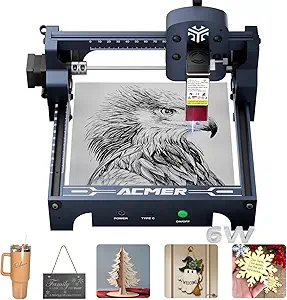
ACMER S1 Laser Engraver 6000mW with 130x130mm Working Area
The ACMER S1 stands out as a versatile option that balances power, precision, and user-friendliness, making it ideal for hobbyists who want detailed results without overwhelming complexity. Compared to the LONGER Ray5 5W, it offers higher laser power (6000mW vs. 5W), allowing for engraving on tougher materials like ceramics and aluminum oxide. However, this increased power comes with a smaller working area (130x130mm), which may limit larger projects. Its preassembled design and compatibility with multiple software platforms make setup straightforward for beginners. Still, safety precautions are essential given its Class 4 laser classification, and software compatibility could pose challenges for some users. Overall, this engraver is a strong choice for hobbyists seeking detailed work on a range of materials, but larger-scale projects will need a bigger machine.
Pros:- High-precision engraving with detailed results
- Supports a wide range of materials including ceramics and aluminum oxide
- Easy to set up and beginner-friendly with preassembled design
Cons:- Limited working area for larger projects
- Requires careful safety measures due to high laser power
- Software compatibility may vary across different platforms
Best for: Hobbyists who prioritize detailed engraving on diverse materials within a compact, portable device.
Not ideal for: Those needing large working areas or working on big projects regularly, as the 130x130mm limit may be restrictive.
- Laser Power:6000mW
- Wavelength:455±5nm
- Focal Length:2mm
- Working Area:130x130mm
- Machine Output:48W
- Speed:up to 10,000mm/min
- Repeatability:0.01mm
- Material Compatibility:wood, bamboo, leather, plastic, PCB, ceramics, aluminum oxide
Bottom line: This engraver suits hobbyists who want detailed, multi-material work in a compact form, but not those with large-scale project needs.
LONGER Ray5 5W Laser Engraver with 3.5″ Touch Screen, 400x400mm Workspace
The LONGER Ray5 5W offers a spacious 400x400mm workspace combined with high-speed engraving capabilities, making it well-suited for hobbyists tackling larger projects or multiple items. Its 0.08mm laser spot and 0.01mm accuracy translate into precise, detailed results, comparable to the ACMER S1 but with a bigger work area. The 3.5-inch touchscreen simplifies operation, and multiple connectivity options—WiFi, USB, and app control—enhance flexibility. However, its weight of over 8 pounds and safety considerations mean setup and operation require some care. While not as powerful as industrial machines like the OMTech Pronto 100W, it balances speed, precision, and size for serious hobbyists wanting more space without the complexity of larger units.
Pros:- Large 400x400mm work area ideal for bigger projects
- Fast engraving speeds up to 10,000mm/min
- High precision with 0.08mm laser spot and 0.01mm accuracy
Cons:- Relatively heavy, requiring a stable setup space
- Setup or software compatibility issues may arise for some users
- Less suitable for very detailed or miniature work compared to smaller units
Best for: Hobbyists seeking large-format engraving on multiple materials with quick turnaround times.
Not ideal for: Beginners or those with limited space, as setup and safety precautions demand some familiarity with laser operation.
- Laser Power:5W
- Working Area:400 x 400 mm
- Laser Spot Size:0.08 mm
- Engraving Accuracy:0.01 mm
- Connectivity:USB, WiFi, App
- Dimensions:12.2 x 23.6 x 5.9 inches
- Weight:8.26 pounds
Bottom line: This model is perfect for hobbyists who want a balance of size, speed, and precision for larger projects.
AlgoLaser 10W Portable Laser Engraver Machine with Touchscreen and AlgoOS System
The AlgoLaser Pixi 10W emphasizes portability and ease of use, making it an attractive choice for small businesses or DIY enthusiasts who need a reliable yet mobile laser engraver. Its 10W laser power allows for engraving on metals, wood, glass, and leather, comparable to the power of larger desktop models like the ACMER S1, but in a much smaller frame. The 3.5-inch touchscreen simplifies operation, and wireless connectivity adds flexibility for quick setups. While its lightweight design (just over 4 pounds) makes it easy to move, this can also impact durability and stability during use. It’s less suited for heavy-duty or large-scale projects but excels in quick, detailed work on small items, especially where space is limited.
Pros:- Highly portable and lightweight for easy transport
- Intuitive touchscreen with simple operation
- Wireless and offline capabilities for flexible use
Cons:- Limited durability due to lightweight design
- Power may be insufficient for very thick or tough materials
- Safety precautions necessary due to laser use and ventilation needs
Best for: Small business owners or hobbyists needing a portable, user-friendly laser for on-the-go projects or limited workspace.
Not ideal for: Users requiring large engraving areas or heavy-duty, continuous operation, as the 10W power and lightweight build may limit longevity.
- Power:10W
- Screen:3.5-inch touchscreen
- Connectivity:USB-C, WiFi
- Dimensions:10.5 x 8.5 x 7.7 inches
- Weight:4.4 pounds
- Warranty:1 year
Bottom line: This laser is ideal for small-scale, mobile engraving tasks, but not for large or industrial projects.
ACMER Laser Engraver Machine K1, 12000mW Desktop Laser Cutter and Engraving Machine, 150×150mm Work Area, Fine 0.08mm Spot for Wood, Acrylic, Plywood, DIY Crafts & Small Business
The ACMER K1 stands out for its compact size and high-precision engraving, making it an excellent choice for hobbyists and small-scale artisans compared to bulkier options like the OMTech Pro 150W. Its 12000mW blue diode laser and 0.08mm spot size deliver fine detail, ideal for intricate crafts on wood, acrylic, and leather. However, its limited 150×150mm work area restricts larger projects, and setup requires some technical calibration, which might challenge absolute beginners. Compared with the ACMER S1, the K1 offers more portable convenience but less power for thicker materials. This model makes the most sense for those needing a desktop device for detailed, small-batch work without space for larger equipment.
Pros:- Extremely compact and lightweight for easy portability
- High precision with a fine 0.08mm laser spot for detailed work
- Supports multiple software platforms for versatile use
- Enclosed design enhances safety and includes a built-in exhaust fan
Cons:- Limited work area of 150×150mm restricts project size
- Requires technical calibration and setup
- Laser power may not suffice for cutting very thick materials
Best for: Hobbyists and small business owners who prioritize precision and portability on a limited workspace
Not ideal for: Users planning large-scale production or working on bigger projects requiring extensive cutting area
- Laser Power:12000mW
- Work Area:150×150mm
- Laser Spot Size:0.08mm
- Repeat Positioning Accuracy:0.01mm
- Max Speed:10,000mm/min
- Supported Materials:Wood, Plywood, Acrylic, Leather, Paper
Bottom line: Ideal for hobbyists seeking a precise, space-efficient laser engraver for small-scale, detailed projects.
ACMER S1 Laser Engraver 3500mW with 130x130mm Working Area
The ACMER S1 with 3500mW laser offers a compelling balance of ease of use and detailed engraving, making it more accessible than the higher-powered ACMER K1 while still capable of fine work. Its 130×130mm work area is suitable for small projects, and the user-friendly setup makes it appealing for hobbyists just starting out. Compared to the ACMER K1, the S1 is less powerful but easier to operate, especially for those new to laser engraving. Its compact size and support for multiple software formats support both hobbyist experimentation and small-scale production. The main tradeoff lies in its smaller work area and the need for safety precautions with a Class 4 laser, which might be intimidating for absolute beginners.
Pros:- User-friendly setup suitable for newcomers
- Supports detailed engraving and cutting with a 3500mW laser
- Compact and lightweight design for home use
- Compatibility with multiple software platforms
Cons:- Limited to a 130×130mm work area
- Safety precautions required due to Class 4 laser
- Learning curve for advanced software features
Best for: Beginners and hobbyists seeking an affordable, easy-to-use laser engraver for detailed small projects
Not ideal for: Users wanting to work on larger materials or needing more powerful cutting for thicker surfaces
- Laser Power:3500mW
- Wavelength:455±5nm
- Focal Length:2mm
- Working Area:130x130mm
- Machine Size:250×250×162mm
- Material Compatibility:Wood, bamboo, leather, plastic, PCB, ceramics
Bottom line: Perfect for beginners who want a straightforward, detailed laser engraver for small projects without complexity.
OMTech Pro 150W Hybrid Laser Cutter and Engraver Machine, 34×54 inches
The OMTech Pro 150W hybrid laser excels in handling both metal and non-metal materials, making it a standout for hobbyists who plan to scale up or diversify their product range. Its massive 34×54 inch work area surpasses typical desktop models, enabling large projects that smaller units like the ACMER K1 or S1 cannot handle. The autofocus feature simplifies adjustments, while the integrated safety features support safer operation in a home or small workshop. However, its size and power make it less suited for those with limited space or beginners who prefer simpler, less intimidating setups. The higher cost and need for proper training are additional considerations for hobbyists with limited technical experience.
Pros:- Capable of cutting and engraving both metal and non-metal materials
- Large work area supports big projects
- Autofocus simplifies setup and adjustments
- Robust safety features for secure operation
Cons:- Requires significant space and proper training
- High initial investment may be prohibitive for hobbyists
- Setup can be complex for those unfamiliar with large laser systems
Best for: Hobbyists ready to expand into large projects or needing a versatile machine for metal and wood work
Not ideal for: Small-scale hobbyists with limited space or those seeking a simple, low-cost engraver
- Laser Power:150W
- Work Area:34×54 inches
- Laser Class:2
- Output Power:0.827 mW
- Cooling System:Built-in water chiller
- Safety Features:Cover interlocks, water protection, air assist, emergency stop
Bottom line: Best suited for hobbyists seeking a professional-grade, large-format laser for versatile, high-volume work.

How We Picked
I evaluated each laser cutter based on key factors that matter most for hobby businesses. These include cutting and engraving performance, ease of setup and operation, build quality, safety features, and value for money. Additionally, I considered the versatility of materials supported and the machine’s scalability for growing hobby projects. Models with intuitive controls and reliable software were prioritized, while those with excessive complexity or high costs were ranked lower. This approach ensures the selected options provide a balanced mix of performance, safety, and affordability suitable for small-scale entrepreneurs.Factors to Consider When Choosing Best Laser Cutters For Hobby Businesses
Choosing the best laser cutter for a hobby business requires understanding several important factors. Not all machines are designed equally, and your choice should reflect your specific needs, budget, and skill level. Here are some considerations to help you make a smarter investment that will grow with your projects.Power and Material Compatibility
The wattage of a laser cutter directly impacts its ability to cut thicker or tougher materials. For hobby businesses focusing on wood, leather, and acrylic, a machine with 10-20W is generally sufficient. If you plan to work with metal or thicker materials, higher power levels—such as 40W or more—are necessary. Keep in mind that more powerful lasers can be more expensive and may require more maintenance or safety precautions, so balance your material needs with your budget.
Size and Workspace
Determine how much space you have and what size projects you intend to produce. Compact models with smaller work areas are ideal for limited spaces and small items like jewelry or keychains. Larger machines with bigger workbeds support bigger custom pieces but require dedicated setups and can be costly. Consider future growth—buying slightly larger than your current needs can prevent the need for a costly upgrade soon.
Ease of Use and Software Compatibility
User-friendly software and straightforward controls make a significant difference, especially if you’re new to laser cutting. Machines with WiFi or USB connectivity and compatible design software reduce setup time and frustration. Some models come with preloaded designs or simple interfaces, which help accelerate your workflow. Advanced features like camera positioning or autofocus can also improve precision but might add complexity; weigh these features against your comfort level.
Safety Features and Build Quality
Safety is paramount, especially if your hobby business involves family or customers. Enclosed models with air assist and safety interlocks minimize risks and contain fumes. A well-built machine with durable components not only lasts longer but also maintains consistent performance. Cheaper, open-frame machines may save money initially but could pose safety hazards or require more frequent repairs, impacting your overall productivity.
Cost and Long-Term Value
While budget constraints matter, investing in a reliable, well-supported machine can save money over time. Cheaper models might seem attractive upfront but often lack durability or customer support, leading to higher maintenance costs. Conversely, premium options offer better performance and safety but may be overkill for very small or hobbyist projects. Prioritize a balance between initial cost, features, and your expected growth trajectory.
Frequently Asked Questions
Can I use a hobby laser cutter for small-scale commercial projects?
Yes, many hobby laser cutters are capable of handling small-scale commercial projects, especially those with higher wattage and larger work areas. However, it’s important to consider the machine’s durability and software support since consistent performance is key for customer satisfaction. Also, ensure that safety features are robust if you plan to run the machine frequently or in a shared workspace. Matching your project scope with the machine’s capabilities will help you produce professional-quality results without over-investing.
How much should I expect to spend on a good hobby laser cutter?
Budgeting around $1,000 to $3,000 generally provides a solid range of options with decent performance for hobby businesses. Lower-priced models tend to have smaller workspaces and less power, suitable for light projects. Mid-range machines offer better build quality, safety features, and versatility. Investing more can provide additional power and larger work areas, which become important as your business grows or if you take on more complex projects. Always consider warranty and customer support as part of the value equation.
Are enclosed laser cutters safer for home use?
Enclosed laser cutters are typically safer because they contain fumes, dust, and laser emissions, reducing exposure risks. They often come with safety interlocks and air filtration systems, making them more suitable for home environments or shared spaces. Open-frame models, while sometimes more affordable or compact, usually require stricter safety protocols and proper ventilation. For hobbyists working at home, an enclosed machine minimizes hazards and simplifies compliance with safety standards.
What maintenance is required for hobby laser cutters?
Regular maintenance includes cleaning the laser lens and mirrors, checking and tightening belts or screws, and ensuring proper ventilation. Many models have auto-focus or air assist systems that require periodic inspection. Lubricating moving parts and replacing worn components extend the lifespan of your machine. Following the manufacturer’s maintenance schedule helps prevent unexpected breakdowns, ensuring your hobby business stays productive and your projects remain consistent.
Should I prioritize power or size when choosing a laser cutter?
It depends on your typical project size and material thickness. If you frequently create larger or thicker items, prioritize higher wattage and a bigger work area. However, if space is limited and your projects are small, a compact, lower-power model might be more practical. Balancing these factors ensures you get a machine that fits your current needs without sacrificing the ability to grow. Remember, larger and more powerful machines tend to cost more and may require more space and maintenance.
Conclusion
For hobby business owners just starting out or working with limited space, the Creality Falcon A1 offers a friendly balance of safety, ease of use, and decent power. If you aim to scale and need higher performance, the OMTech Pronto 100W provides a professional-grade setup capable of handling larger projects efficiently. Budget-conscious hobbyists should consider the ATOMSTACK 20W for its affordability and decent quality, while more advanced users or those with bigger ambitions will find the OMTech Pro 150W to be a powerful, future-proof investment. Ultimately, your choice hinges on your project scope, safety requirements, and budget—select accordingly to fuel your hobby business growth. As an affiliate, we earn on qualifying purchases.Halloween Picks

Haunted Hill Farm 4.6-Foot Spinning Beatrix Halloween Animatronic

Haunted Hill Farm 2-Ft. Zombie Raccoon Halloween Animatronic

Kalolary 12ft Halloween Witch Haunted House Inflatable Archway