
Choosing the best curved gaming monitor at 34 inches involves balancing size, performance, and features. The Alienware AW3425DWM stands out for its high-end build and fast response times, making it ideal for competitive gamers. The KOORUI 34-inch Ultrawide offers a strong blend of affordability and high refresh rates, perfect for immersive play without breaking the bank. Meanwhile, the Samsung Odyssey G5 provides a striking 1000R curve for an ultra-immersive experience, though it may have fewer premium features. These options reveal tradeoffs between price, performance, and visual immersion. Continue reading for a detailed breakdown of each monitor to find your ideal match.
Key Takeaways
- Top picks balance high refresh rates with vibrant color accuracy for immersive gameplay.
- High-end models offer faster response times and better build quality but at a premium price.
- Ultrawide screens enhance multitasking and immersive gaming, yet may require more powerful hardware.
- Curvature radius impacts immersion; 1800R or 1500R are common, with more aggressive curves like 1000R providing a more enveloping experience.
- Connectivity options and ergonomic features vary widely, influencing ease of setup and long-term comfort.




More Details on Our Top Picks
Alienware 34 Curved Gaming Monitor – AW3425DWM
The Alienware AW3425DWM stands out as the best choice for gamers who prioritize top-tier performance and stunning visuals. Its 1500R curvature and ultrawide 34-inch screen deliver an immersive experience, surpassing many competitors like the KOORUI with its higher refresh rate and better color coverage. The 180Hz refresh rate paired with a 1ms response time ensures exceptionally smooth gameplay, while VESA DisplayHDR 400 and DCI-P3 95% coverage make visuals vibrant and detailed. However, this premium monitor comes with a higher price tag and a large footprint, which might not suit more compact setups. It makes the most sense for dedicated gamers seeking premium features and excellent image quality, willing to invest in a top-tier display.
Pros:- Ultra-wide 34-inch curved display enhances immersion
- High 180Hz refresh rate with 1ms response time for responsiveness
- Vibrant visuals with DCI-P3 95% coverage and HDR support
- Eye comfort features for long gaming sessions
Cons:- Premium price may be too expensive for budget-conscious users
- Large size may not fit in smaller gaming setups
Best for: High-end gamers who want the best in responsiveness, color, and immersion without compromise.
Not ideal for: Casual gamers or those with limited desk space, as the size and cost may be prohibitive.
- Size:34 inches
- Resolution:3440×1440 WQHD
- Refresh Rate:180Hz
- Response Time:1ms gray to gray
- Curve Radius:1500R
- Color Coverage:DCI-P3 95%
Bottom line: This monitor is ideal for serious gamers seeking a high-performance, immersive display and willing to invest in premium quality.
CRUA 34 Inch Curved Gaming Monitor, 21:9 WQHD 3440×1440, 165Hz/144Hz, FreeSync, PIP/PBP, 120% sRGB, HDMI 2.0 & DP 1.4, Wall Mountable, Tilt Adjustable
The CRUA 34-inch curved monitor offers a compelling balance of performance and affordability, especially compared to the premium Alienware. Its 165Hz refresh rate and FreeSync support enable smooth gameplay, although the HDMI is limited to 120Hz at full resolution, which may disappoint more demanding gamers. The wide 21:9 aspect ratio and adjustable stand make it well-suited for multitasking and immersive gaming alike, with versatile connectivity including HDMI and DisplayPort. However, its color accuracy is less refined than higher-end models like the KOORUI, making it less ideal for professional color work. This monitor makes the most sense for budget-conscious gamers who want a large, immersive display with good performance and flexibility.
Pros:- Immersive 34-inch curved display with wide viewing angles
- High refresh rate up to 165Hz for smooth gameplay
- Versatile connectivity including HDMI and DisplayPort
- Adjustable tilt and wall-mount compatibility
Cons:- HDMI supports only up to 120Hz at full resolution
- Limited color accuracy compared to premium options
Best for: Casual gamers or multitaskers seeking a large, curved display without breaking the bank.
Not ideal for: Professional content creators requiring precise color accuracy or users needing 165Hz at full resolution via HDMI.
- Size:34 inches
- Resolution:3440×1440 WQHD
- Refresh Rate:165Hz
- Curve Radius:1500R
- Color Gamut:120% sRGB
- Connectivity:HDMI 2.0 & DP 1.4
Bottom line: This monitor suits budget-conscious gamers wanting large, curved visuals with decent performance and flexible setup options.
KOORUI 34-inch Curved Ultrawide WQHD Gaming Monitor, 180Hz, HDR400, FreeSync Premium
The KOORUI 34-inch ultrawide monitor is a strong contender for gamers who value color vibrancy alongside high refresh rates. Its 180Hz refresh rate and 1ms response time promise smooth gameplay, similar to the Alienware but at a more accessible price point. The monitor’s HDR400 support and wide DCI-P3 95% coverage deliver rich, vibrant visuals, making it stand out against less colorful models like the CRUA. Its ergonomic stand and picture-in-picture modes add to its versatility. However, its size may demand a spacious desk, and it has fewer advanced connectivity options than some rivals. This pick is best for gamers who want a colorful, fast display without the high cost of premium brands.
Pros:- Vibrant color reproduction with HDR400 and wide gamut coverage
- Fast 180Hz refresh rate and 1ms response time for gaming
- Adjustable ergonomic stand for comfortable use
- Supports PIP and PBP modes for multitasking
Cons:- Large size may require ample desk space
- Limited connectivity options compared to higher-end models
Best for: Gamers seeking vibrant visuals and fast response in a reasonably priced ultrawide monitor.
Not ideal for: Color-critical professionals or users with limited desk space, due to its size and somewhat limited connectivity.
- Size:34 inches
- Resolution:3440×1440
- Refresh Rate:180Hz
- HDR:HDR400
- Color Gamut:DCI-P3 95%
Bottom line: Ideal for gamers who prioritize vivid visuals and high refresh rates at an affordable price.
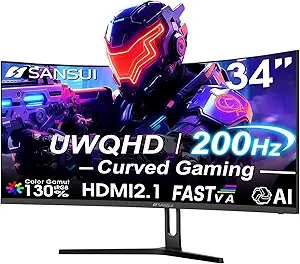
SANSUI 34 Inch UWQHD 200Hz Curved Gaming Monitor with AI Tech, 3440x1440P Ultrawide, 1500R Curved, 21:9, PIP/PBP, HDMI 2.1 & DP1.4 Ports
The SANSUI 34-inch UWQHD monitor pushes the envelope with a 200Hz refresh rate and AI-enhanced features, making it appealing for gamers who want the latest tech. Its 1500R curvature and ultrawide aspect ratio create a highly immersive experience, comparable to the SANSUI 34 240Hz model but with slightly lower maximum refresh rate. The inclusion of HDMI 2.1 and DisplayPort 1.4 offers future-proof connectivity, making it suitable for high-end gaming setups. The AI features, like Crosshair and Visual Enhance, are unique additions that can improve gameplay precision and visual quality. On the downside, it lacks built-in speakers and has a limited warranty, which might concern some buyers. It’s best for gamers who want advanced features and high refresh rates in a versatile, tech-forward package.
Pros:- High 200Hz refresh rate boosts responsiveness
- AI-enhanced tools for gaming assistance and visual clarity
- Future-proof HDMI 2.1 and DisplayPort 1.4 connectivity
- Immersive ultrawide 21:9 aspect ratio
Cons:- No built-in speakers, requiring external audio
- Limited warranty details may concern some users
Best for: Tech-savvy gamers who want cutting-edge features, high refresh rates, and future-ready connectivity.
Not ideal for: Users looking for a budget-friendly display or those needing built-in speakers for casual gaming.
- Size:34 inches
- Resolution:3440×1440
- Refresh Rate:200Hz
- Curve Radius:1500R
- Ports:HDMI 2.1 & DP 1.4
- Additional Features:AI Crosshair, Visual Enhance
Bottom line: This monitor is well-suited for gamers seeking advanced features, high responsiveness, and future-proof connectivity in a curved ultrawide.
SANSUI 34 Inch 240Hz Ultrawide Curved Gaming Monitor UWQHD 3440×1440, 21:9, HDR400, Fast VA, PIP/PBP, AI Crosshair, Visual Enhance, 1ms MPRT, HDMI 2.1 x2, DP 1.4 x2
The SANSUI 34-inch 240Hz monitor is designed for gamers seeking the highest refresh rates and advanced visual features. Its 1500R curvature and 3440×1440 resolution create an immersive experience akin to premium options but at a more accessible price. The 240Hz refresh rate and 1ms MPRT response time deliver outstanding responsiveness, making it ideal for fast-paced competitive gaming. Features like AI Crosshair and Visual Enhance add precision and clarity, setting it apart from standard models. Multiple HDMI 2.1 and DisplayPort 1.4 inputs provide extensive connectivity options. A notable drawback is the absence of built-in speakers, which could be inconvenient for some. It’s best for highly competitive gamers who want maximum refresh and visual enhancement features.
Pros:- Maximum 240Hz refresh rate for ultra-smooth gameplay
- 1ms MPRT response time for rapid responsiveness
- AI features like Crosshair and Visual Enhance for precision
- Multiple high-speed ports including HDMI 2.1 and DP 1.4
Cons:- No built-in speakers, needing external audio setup
- Potential overkill for less competitive gaming needs
Best for: Competitive gamers who prioritize high refresh rates, rapid responses, and advanced visual tools.
Not ideal for: Casual users or those seeking a budget-friendly, all-in-one multimedia solution with speakers.
- Size:34 inches
- Resolution:3440×1440
- Refresh Rate:240Hz
- Response Time:1ms MPRT
- Curve Radius:1500R
- Additional Features:AI Crosshair, Visual Enhance
Bottom line: This monitor is perfect for competitive gamers demanding the highest refresh rates and advanced visual enhancements in a curved ultrawide design.
ASUS VG34VQL1B TUF 34-Inch Curved Gaming Monitor – WQHD, 165Hz, 1ms, HDR400, FreeSync Premium
The ASUS VG34VQL1B stands out for its combination of high refresh rate, fast response time, and professional-grade color accuracy, making it a versatile choice for both gamers and creative professionals. Compared with the Samsung Odyssey G5, it offers a slightly higher resolution and more extensive connectivity options, including multiple USB ports. However, its premium features come at a higher price, which might be a barrier for budget-conscious buyers. Its 1500R curvature offers a comfortable, immersive experience without the extreme wrap of some competitors, and the adjustable stand adds ergonomic flexibility. This model is better suited for users who want a monitor that can handle fast-paced gaming, detailed editing, and extended use without compromise.
Pros:- High 165Hz refresh rate and 1ms response time for smooth gameplay
- HDR400 support enhances contrast and color depth
- Extensive connectivity including multiple DisplayPorts and USB hub
- Height adjustable for ergonomic comfort
Cons:- Premium price can be prohibitive for some users
- Requires a capable graphics card to fully utilize FreeSync and G-SYNC compatibility
Best for: Gamers who also do creative work and need a highly adaptable display
Not ideal for: Casual gamers or users on a strict budget, as its premium features may be unnecessary and costly
- Screen Size:34 inches
- Resolution:3440×1440 (WQHD)
- Curvature:1500R
- Refresh Rate:165Hz (supports 144Hz)
- Response Time:1ms (MPRT)
- HDR:DisplayHDR 400
Bottom line: This monitor is ideal for gamers who need a versatile, performance-oriented display that can also serve creative tasks.
Sceptre 34-Inch Curved Ultrawide WQHD Monitor (3440 × 1440), 180Hz, 1ms, Built-in Speakers, Machine Black
The Sceptre 34-Inch offers a compelling mix of ultrawide immersion and fast performance, with a 180Hz refresh rate and 1ms response time. It outperforms many competitors like the LG 34G600A in raw refresh rate, making it especially appealing for competitive gaming. Its built-in speakers add convenience, and the 3440×1440 resolution delivers sharp, expansive visuals. Nevertheless, its limited input options—mainly DisplayPort—may restrict connectivity for some setups, and its lack of extensive stand adjustments could impact ergonomic comfort. This monitor makes the most sense for gamers prioritizing high frame rates and wide vistas, especially if budget constraints are a concern.
Pros:- High 180Hz refresh rate for ultra-smooth gameplay
- Fast 1ms response time reduces ghosting
- Vivid visuals with 3440×1440 resolution and HDR support
- Built-in speakers for basic audio needs
Cons:- Limited input options may restrict connectivity
- Lack of extensive ergonomic adjustments
Best for: Competitive gamers seeking high refresh rates and an immersive ultrawide display
Not ideal for: Professional content creators who require precise color calibration and multiple input options
- Size:34 inches
- Resolution:3440×1440
- Refresh Rate:180Hz
- Response Time:1ms
- Curvature:1500R
- HDR:Supported
Bottom line: This monitor is perfect for gamers who want a high-refresh ultrawide experience without stretching their budget.
Samsung 34-Inch Odyssey G5 Ultra-Wide Gaming Monitor with 1000R Curved Screen, 165Hz, 1ms, FreeSync Premium, WQHD, Black
The Samsung Odyssey G5 excels at delivering an immersive gaming experience thanks to its 1000R curvature, which closely matches the natural shape of the human eye, unlike the flatter curves of other models. Its 165Hz refresh rate and 1ms response time ensure fluid gameplay, and HDR10 support adds vibrant color accuracy. Compared with the LG 34G600A-B, it emphasizes deep immersion with its more aggressive curvature but offers fewer ergonomic adjustments. While its bold design and high performance appeal to hardcore gamers, the large size and high price could be limiting factors for some.
Pros:- Deep 1000R curvature for an immersive viewing experience
- High 165Hz refresh rate and 1ms response time
- Vivid HDR10 support for rich colors
- Multiple connectivity options
Cons:- Large footprint may not fit smaller desks
- Limited stand adjustability
Best for: Gamers who prioritize an intensely immersive experience and vibrant visuals
Not ideal for: Desk setups with limited space or users seeking highly adjustable stands
- Size:34 inches
- Resolution:WQHD (3440×1440)
- Curvature:1000R
- Refresh Rate:165Hz
- Response Time:1ms (MPRT)
- HDR:HDR10
Bottom line: This monitor is suited for gamers seeking maximum immersion with vibrant display quality, but it requires ample space and investment.
LG 34G600A-B 34-inch Ultragear WQHD Curved Gaming Monitor 160Hz, AMD FreeSync Premium, HDR10, Built-in Speakers, Adjustable Stand
The LG 34G600A-B offers a balanced set of features, including a 160Hz refresh rate and 1ms Motion Blur Reduction, making it well-suited for fast-paced gaming. Its adjustable stand with tilt, height, and swivel options stands out compared to models like the Sceptre, which lack extensive ergonomic features. The inclusion of built-in speakers adds convenience, but their audio quality isn’t optimal for serious listening. While its 1800R curvature provides a comfortable viewing angle, it might not be as immersive as the more aggressive curves of other models. This monitor makes most sense for gamers who value ergonomic flexibility and a solid all-around experience.
Pros:- Ergonomic stand with tilt, height, and swivel adjustments
- High 160Hz refresh rate and 1ms MBR response time
- Good color coverage with HDR10 and 99% sRGB
- Built-in stereo speakers
Cons:- Limited to gaming and multimedia, less suited for editing workflows
- No USB-C port for modern connectivity
Best for: Multiplayer gamers and streamers who need ergonomic features and decent audio
Not ideal for: Professional content creators needing precise color calibration or high-end connectivity options
- Size:34 inches
- Resolution:3440×1440
- Curvature:1800R
- Refresh Rate:160Hz
- Response Time:1ms MBR
- HDR:HDR10
Bottom line: This monitor is ideal for gamers seeking an ergonomic, versatile display for extended play and streaming.
SANSUI 34-Inch Curved Gaming Monitor UWQHD 3440 x 1440, 165Hz, 1ms, HDR, FreeSync, HDMI & DP
The SANSUI 34-Inch UWQHD provides an excellent balance of performance and features, with a 165Hz refresh rate, 1ms response time, and HDR support, comparable to the ASUS VG34VQL1B. Its 1500R curvature offers a comfortable, immersive experience, while the inclusion of HDMI and DisplayPort inputs enhances versatility. Unlike the Sceptre, it offers more input options and a slightly better color coverage, making it a flexible choice for gamers and casual multimedia users alike. Its slightly lower peak brightness and lack of extensive stand adjustments are minor tradeoffs for the broader compatibility and balanced feature set.
Pros:- Fast 165Hz refresh rate for smooth gaming
- 1ms response time reduces motion blur
- Support for HDR and wide color coverage
- Multiple input options, including HDMI and DP
Cons:- Lacks extensive stand adjustments
- No built-in speakers included
Best for: Gamers who want a well-rounded ultrawide monitor with strong connectivity options
Not ideal for: Content creators needing ultra-precise color accuracy or professional-grade calibration
- Size:34 inches
- Resolution:3440×1440
- Curvature:1500R
- Refresh Rate:165Hz
- Response Time:1ms (MPRT)
- HDR:Supported
Bottom line: This monitor offers a balanced mix of speed, visuals, and connectivity suitable for most gaming and multimedia needs.
Sceptre 34-Inch Curved Ultrawide WQHD Monitor, 3440 x 1440, 180Hz/165Hz, DisplayPort x2, 100% sRGB, 1ms, Built-in Speakers
This Sceptre model stands out for combining a high 180Hz refresh rate with a fast 1ms response time, making it an excellent choice for gamers who want smooth, tear-free visuals. Its ultrawide 3440 x 1440 resolution provides detailed imagery, rivaling higher-priced options like the Alienware AW3425DWM in clarity. Compared to the 34 Inch Ultrawide Curved Gaming Monitor with 165Hz, it offers a higher maximum refresh rate, but it may feel bulkier on smaller desks. The dual DisplayPorts support smooth multi-source setups, though the absence of HDMI limits compatibility with some devices. The built-in speakers add convenience but are not a substitute for quality external audio. This monitor is ideal for gamers who prioritize high refresh rates and multitasking, accepting a potentially larger footprint and a slightly higher price.
Pros:- Exceptional 180Hz refresh rate for ultra-smooth gameplay
- Quick 1ms response time reduces motion blur
- Dual DisplayPort inputs support multi-device setups
- Vivid 100% sRGB color coverage enhances visuals
Cons:- Large size may overwhelm small or cluttered desks
- Limited HDMI connectivity could restrict device compatibility
Best for: Gamers and multitaskers who need a versatile, high-performance ultrawide display with fast response times.
Not ideal for: Users with limited desk space or those seeking HDMI-only connectivity, as it lacks HDMI ports and might be too large for compact setups.
- Screen Size:34 inches
- Resolution:3440 x 1440 (WQHD)
- Refresh Rate:180Hz/165Hz
- Response Time:1ms
- Color Coverage:100% sRGB
- Ports:2 x DisplayPort
- Features:Built-in speakers, LED backlit, PBP & PIP support
Bottom line: This model suits high-end gamers who want the fastest refresh rates and detailed visuals, even if it means a larger footprint and higher cost.
34 Inch Ultrawide Curved Gaming Monitor – WQHD 3440x1440p, 165Hz, 120% sRGB, FreeSync, VESA Mountable
This monitor offers a balanced mix of performance and flexibility, with a 165Hz refresh rate and vibrant 120% sRGB coverage that benefits gamers and creative professionals alike. Its 1500R curvature delivers immersion without the extreme wrap of 1000R models like Samsung’s Odyssey, making it more comfortable for extended use. Unlike the Sceptre, which emphasizes speed, this model provides broader connectivity options, including HDMI and DisplayPort, and VESA mounting capability, making it suitable for custom setups. However, the HDMI port only supports 100Hz at full resolution, limiting some of its potential performance. It’s less aggressive in gaming terms than the Sceptre but offers a more adaptable platform for multitasking, creative work, and casual gaming.
Pros:- Immersive 1500R curved screen for comfortable viewing
- VESA mount support for flexible positioning
- High 120% sRGB color coverage for vivid visuals
- Multiple connectivity options including HDMI and DisplayPort
Cons:- HDMI only supports 100Hz, limiting full 165Hz performance
- Not as fast as the Sceptre’s 1ms response time for competitive gaming
Best for: Creative professionals and gamers who want a flexible, colorful display with good performance and VESA compatibility.
Not ideal for: Competitive gamers who prioritize maximum refresh rates or ultra-fast response times, as the 165Hz may not be enough for high-tier eSports performance.
- Size:34 inches
- Resolution:3440x1440p (WQHD)
- Refresh Rate:165Hz
- Color Gamut:120% sRGB
- Brightness:300 cd/m²
- Contrast Ratio:4000:1
- Curvature:1500R
- Connectivity:2x HDMI, 2x DisplayPort, 3.5mm audio
Bottom line: This monitor fits users seeking a colorful, versatile display that balances gaming and creative work with flexible mounting options.
How We Picked
These monitors were selected based on a combination of performance metrics, build quality, versatility, and value. Priorities included high refresh rates (at least 144Hz), low response times, and support for adaptive sync technologies like FreeSync or G-Sync. We evaluated display quality through color accuracy, contrast, and HDR support, alongside design factors such as ergonomics and connectivity. Each product was ranked to reflect its overall balance of these features, with a focus on real-world gaming needs and long-term usability. This approach ensures that each pick addresses specific gamer profiles, from competitive players to immersive enthusiasts.Factors to Consider When Choosing Best Curved Gaming Monitors 34 Inch
When selecting a 34-inch curved gaming monitor, understanding key features helps you make an informed choice. Factors like refresh rate and response time directly impact gaming smoothness, especially in fast-paced titles. Screen curvature enhances immersion but varies in intensity—more aggressive curves can feel more enveloping but may distort peripheral vision. Color accuracy and HDR support improve visual richness, vital for both gaming and multimedia. Ergonomics and connectivity ensure long hours of comfort and compatibility with your setup. Considering these broader aspects prevents buyer remorse and maximizes your investment.Refresh Rate and Response Time
High refresh rates (at least 144Hz) deliver smoother gameplay, reducing motion blur in fast scenes. Response times of 1ms or 2ms are preferred for competitive gaming, minimizing ghosting and lag. While higher refresh rates often come at a premium, they significantly enhance the gaming experience, especially in titles like shooters or racing games. Balance your desired performance level with your hardware capabilities and budget to find the best fit.
Screen Curvature and Size
The 1800R curvature is common and provides a good level of immersion without distorting peripheral vision. More aggressive curves like 1500R or 1000R offer a more enveloping experience, ideal for immersive gaming but may cause some distortion or discomfort over long sessions. The 34-inch size offers a broad viewing area, but ensure your desk space and graphics card can handle the extra load, especially for ultrawide resolutions.
Color Accuracy and HDR
Wide color gamut support (like sRGB 99% or higher) and HDR capabilities enhance visual fidelity, making games look more vibrant and realistic. While not all monitors in this category support true HDR, models with HDR400 or higher provide noticeable improvements. For competitive players, color accuracy might be less critical, but for immersive storytelling or multimedia use, these features add significant value.
Connectivity and Ergonomics
Multiple ports (HDMI, DisplayPort, USB) ensure compatibility with various devices and peripherals. Ergonomic features like height adjustment, tilt, and swivel help maintain comfort during long gaming sessions. Wall-mount compatibility can also free up space and improve your setup’s flexibility. Ignoring these aspects can lead to discomfort or inconvenient setups over time.
Price and Value
Higher-priced monitors tend to offer better build quality, faster response times, and more advanced features like better HDR or higher refresh rates. However, budget options can still provide excellent performance for casual gaming. Consider your priorities—whether immersive features or raw performance—and select a model that gives the best value within your budget, avoiding overpaying for features you won’t use.
Frequently Asked Questions
Is a 34-inch curved monitor suitable for competitive gaming?
While a 34-inch curved monitor can deliver an immersive experience, it may not be ideal for fast-paced competitive gaming where quick reactions and peripheral awareness are critical. Monitors with higher refresh rates (like 165Hz or 200Hz) and lower response times are better suited for competitive play, regardless of size or curve. If your focus is on precision and speed, prioritize these performance features over the size or curvature of the display.
Does the curvature of a monitor affect gameplay performance?
Yes, the curvature impacts immersion and field of view, making gameplay feel more natural and enveloping. However, more aggressive curves like 1000R can sometimes cause distortion or discomfort during extended sessions, especially if you’re sensitive to visual differences. For general gaming, an 1800R or 1500R curve offers a good balance between immersion and comfort, without distorting peripheral vision too much.
Are ultrawide 34-inch monitors worth the extra cost?
Ultrawide monitors provide a broader visual field, enhancing immersion and multitasking capabilities. They are particularly beneficial for simulation, racing, and open-world games. However, they demand more from your graphics card and may require adjustments in gameplay settings. If you value immersion and have a powerful system, the extra investment often pays off, but casual gamers might find standard ultrawide models sufficient.
What should I consider regarding connectivity options?
Ensure the monitor has the necessary ports for your setup, such as HDMI 2.0 or 2.1, DisplayPort, and USB hubs if needed. Having multiple ports allows for connecting consoles, PCs, and peripherals without constantly unplugging devices. Also, check if the monitor supports VESA mounting if you plan to customize your setup. Good connectivity options extend the monitor’s versatility and ease of use over time.
Is HDR support important for gaming on a 34-inch curved monitor?
HDR enhances visual quality by increasing contrast and color vibrancy, making games more realistic and immersive. However, not all HDR implementations are equal; monitors with HDR400 or higher are better suited for gaming. Keep in mind that HDR performance also depends on your graphics card and the game’s support for HDR. For an immersive visual experience, choosing a monitor with solid HDR capabilities adds considerable value.
Conclusion
For competitive gamers prioritizing fast response times and high refresh rates, the Alienware AW3425DWM makes an excellent choice. Casual or immersive players will appreciate the Samsung Odyssey G5 or KOORUI 34-inch Ultrawide for their immersive curves and vibrant visuals. Budget-conscious buyers should consider models like the Sceptre 34-Inch Curved Ultrawide, which offers strong performance at a more accessible price. For those seeking a premium setup with extensive features, the SANSUI 34 Inch 240Hz provides high-end performance. Ultimately, your choice depends on your gaming style, setup space, and budget—match your needs to these highlights for the best gaming experience.