For those seeking the best premium wireless mechanical keyboards, the options can be overwhelming. The top models stand out for their high-quality build, responsive typing experience, and seamless wireless connectivity, but they often come with tradeoffs like higher prices or limited customization. The Keychron K10 HE offers a robust hall effect switch for durability, while the Logitech MX Mechanical delivers a refined typing experience with excellent software support. Other options, like the AULA F75 Pro and RK Royal Kludge S98, balance features with more affordability. Continue reading for a detailed breakdown of these options and what makes each one unique.

Prime made for students and young adults
- Fast, free delivery for dorm and study essentials
- Prime Video and Amazon Music included
- Member-only deals
Key Takeaways
- The highest build quality often comes with a premium price tag but results in better durability and feel.
- Wireless connectivity stability varies; Bluetooth 5.0 and multi-mode support are key for seamless performance.
- Customization options like hot-swappable switches and programmable keys are more common in premium models.
- Design and layout choices significantly impact usability, especially for gaming or professional work.
- Tradeoffs often include size, price, and feature set; prioritizing one may limit others.
| Keychron K10 HE Full-Size Hall Effect Wireless Mechanical Keyboard | 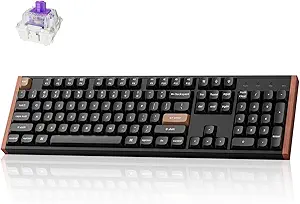 | Best Overall Premium Wireless Mechanical Keyboard | Layout: Full-Size | Switch Type: Hall Effect magnetic switches | Connectivity: Bluetooth 5.2, 2.4 GHz, Type-C wired | VIEW LATEST PRICE | See Our Full Breakdown |
| AULA F75 Pro Wireless Mechanical Keyboard, 75% Hot Swappable, RGB Backlit, Customizable with Knob and Side Printed PBT Keycaps |  | Best Compact Wireless Keyboard with Customization and RGB Effects | Connection: Bluetooth 5.0, 2.4GHz, USB wired | Battery: 4000mAh rechargeable | Layout: 75% (81 keys) | VIEW LATEST PRICE | See Our Full Breakdown |
| Logitech MX Mechanical Wireless Illuminated Performance Keyboard |  | Best for Multi-Device Productivity with Smart Illumination | Weight: 29.2 oz (828 g) | Dimensions: 1.02 x 17.08 x 5.18 in | Switch Type: Clicky mechanical | VIEW LATEST PRICE | See Our Full Breakdown |
| Logitech MX Mechanical Wireless Illuminated Keyboard Tactile – Graphite | | Best Quiet Tactile Mechanical Keyboard with Smart Backlighting | Switch Type: Tactile Quiet mechanical | Backlit: Smart, auto-adjusting illumination | Connectivity: Bluetooth and Logi Bolt | VIEW LATEST PRICE | See Our Full Breakdown |
| AULA F99 Wireless Mechanical Keyboard, Tri-Mode BT5.0/2.4GHz/USB-C, Hot Swappable, RGB Backlit, 96% Compact Layout for Gaming and Work |  | Best Versatile 96% Wireless Keyboard for Gaming and Productivity | Connection Modes: BT5.0, 2.4GHz, USB-C | Number of Devices Supported: Up to 5 | Switch Type: Pre-lubed linear, hot-swappable | VIEW LATEST PRICE | See Our Full Breakdown |
| ASUS ROG Strix Scope II 96 Wireless Mechanical Gaming Keyboard |  | Best Versatile Full-Size Wireless Keyboard | Size: 96% full-size with num pad | Connectivity: Bluetooth, 2.4GHz, wired | Switch Type: Hot-swappable ROG NX Snow linear or ROG NX Storm clicky | VIEW LATEST PRICE | See Our Full Breakdown |
| Logitech Alto Keys K98M Wireless Mechanical Gasket Keyboard – Graphite |  | Best Compact Premium Gasket Keyboard | Switch Type: Marble Switches | Backlighting: White non-RGB | Layout: 98-key with Numpad | VIEW LATEST PRICE | See Our Full Breakdown |
| RK Royal Kludge S98 Wireless Mechanical Keyboard with Smart Display & Knob |  | Best Feature-Rich Gaming and Customization Keyboard | Display: Smart GIF, date, battery, connection | Connection modes: Bluetooth, 2.4GHz, USB-C | Design: Top-mount, sound-absorbing foam | VIEW LATEST PRICE | See Our Full Breakdown |
| premium mechanical keyboards wireless | Switch Type | Connectivity |
|---|---|---|
| Keychron K10 HE Full-Size Hall | Hall Effect magnetic switches | Bluetooth 5.2, 2.4 GHz, Type-C wired |
| AULA F75 Pro Wireless Mechanic | — | — |
| Logitech MX Mechanical Wireles | Clicky mechanical | Bluetooth, Logi Bolt |
| Logitech MX Mechanical Wireles | Tactile Quiet mechanical | Bluetooth and Logi Bolt |
| AULA F99 Wireless Mechanical K | Pre-lubed linear, hot-swappable | — |
| ASUS ROG Strix Scope II 96 Wir | Hot-swappable ROG NX Snow linear or ROG NX Storm clicky | Bluetooth, 2.4GHz, wired |
| Logitech Alto Keys K98M Wirele | Marble Switches | Bluetooth, Logi Bolt USB |
| RK Royal Kludge S98 Wireless M | — | — |
More Details on Our Top Picks
Keychron K10 HE Full-Size Hall Effect Wireless Mechanical Keyboard
The Keychron K10 HE stands out for its use of Hall Effect magnetic switches, which promise exceptional durability and responsiveness, making it ideal for heavy daily use. Unlike the Logitech MX Mechanical, which relies on tactile but quieter switches, the K10’s magnetic switches offer a unique typing feel that many enthusiasts will appreciate. Its tri-mode connectivity supports seamless switching across devices, though its higher price reflects these advanced features and the premium build, including rosewood accents. Battery life remains somewhat unclear, which could be a concern for those needing consistent wireless performance without frequent charging. This keyboard suits professionals who want a durable, multi-device wireless setup with a touch of luxury, but it might be overkill for casual users focused solely on affordability or basic functionality.
Pros:- Exceptional durability from Hall Effect magnetic switches
- Versatile tri-mode connectivity for multiple devices
- Elegant design with natural wood accents
Cons:- Higher price point due to advanced switch technology
- Limited information on battery longevity
Best for: Power users and hobbyists seeking a highly durable, multi-system wireless keyboard with premium design elements.
Not ideal for: Budget-conscious buyers or those needing long battery life without frequent recharging, due to potential price and unclear battery info.
- Layout:Full-Size
- Switch Type:Hall Effect magnetic switches
- Connectivity:Bluetooth 5.2, 2.4 GHz, Type-C wired
- Compatibility:macOS, Windows, Linux
- Keycaps:Double-shot PBT
- Design Features:Wood sidings, customizable macros, magnetic sensors
Our verdict“This is the best choice for users who prioritize durability, multi-device support, and premium aesthetics in a wireless setup.”
AULA F75 Pro Wireless Mechanical Keyboard, 75% Hot Swappable, RGB Backlit, Customizable with Knob and Side Printed PBT Keycaps
The AULA F75 Pro offers a compact 75% layout packed with features for gamers and typists alike. Its tri-mode connectivity and hot-swappable switches make customization straightforward, especially for users who enjoy tinkering without needing to purchase additional tools. The multi-function knob adds convenience for volume and lighting control, although the setup process can be complex for beginners, potentially requiring driver installation for full feature access. While its RGB backlighting with multiple effects enhances visual appeal, the limited color options for keycaps might disappoint those seeking more aesthetic variety. This pick makes the most sense for users who need a space-saving keyboard with extensive customization, but less so for those who prefer plug-and-play simplicity.
Pros:- Tri-mode connectivity supports multiple devices
- Hot-swappable switches for easy customization
- Rich RGB lighting with multiple effects
Cons:- Setup complexity may challenge beginners
- Limited keycap color options
Best for: Gamers and tech-savvy users who want a highly customizable, space-efficient wireless keyboard with vibrant lighting.
Not ideal for: Beginners or users preferring simple, straightforward setups without driver dependencies or extensive customization.
- Connection:Bluetooth 5.0, 2.4GHz, USB wired
- Battery:4000mAh rechargeable
- Layout:75% (81 keys)
- Backlit:16.8 million RGB colors, 16 effects
- Switch Support:3-pin and 5-pin hot-swappable
- Keycaps:Side-printed PBT, double injection
Our verdict“This is ideal for experienced users who value customization and space-saving design in a wireless gaming or productivity keyboard.”
Logitech MX Mechanical Wireless Illuminated Performance Keyboard
The Logitech MX Mechanical combines a sleek, full-size profile with tactile, clicky switches, offering a satisfying typing experience for work and play. Its smart backlit keys automatically adjust to ambient light, reducing eye strain and enhancing visibility, a feature that sets it apart from the more customizable but less adaptive Logitech MX Mechanical Tactile in the Graphite color. Multi-device pairing via Bluetooth or Logi Bolt makes it highly versatile across various operating systems, although full key customization requires Logitech’s software, which some may find limiting compared to open-standards. The rechargeable battery delivers impressive longevity, but users should be aware that lighting and usage patterns influence battery life. This model fits well for professionals who want a reliable, tactile, and multi-device wireless keyboard with minimal fuss.
Pros:- Tactile, clicky keys for satisfying typing
- Smart, ambient light-responsive backlighting
- Supports multi-device pairing across platforms
Cons:- Requires Logitech software for full customization
- Limited to Bluetooth and Logi Bolt receivers
Best for: Office professionals and multi-device users who prioritize tactile feedback and seamless lighting adaptation.
Not ideal for: Casual users or those seeking extensive key remapping without installing additional software, as full customization is software-dependent.
- Weight:29.2 oz (828 g)
- Dimensions:1.02 x 17.08 x 5.18 in
- Switch Type:Clicky mechanical
- Battery:Rechargeable Li-Po 1500 mAh
- Connectivity:Bluetooth, Logi Bolt
- Compatibility:Multiple OS
Our verdict“This keyboard suits users who want reliable, tactile typing with smart lighting and multi-device support without complex customization needs.”
Logitech MX Mechanical Wireless Illuminated Keyboard Tactile – Graphite
The Logitech MX Mechanical Tactile in Graphite offers a quieter, tactile experience thanks to its low-profile, quiet mechanical switches, making it ideal for quiet office environments. Its smart backlit keys automatically adjust based on lighting, which is convenient for multi-OS workflows. While it shares many features with the standard MX Mechanical model, the tactile switches provide a more distinct feedback that many typists will prefer, especially over the clicky switches found in Logitech’s other models. The use of 45% recycled plastic enhances its eco-credentials, but the price remains high, and limited connectivity options mean it’s best for those invested in Bluetooth or Logi Bolt ecosystems. This model is perfect for users needing a quieter, comfortable, multi-device wireless keyboard with an eco-friendly twist.
Pros:- Quiet, tactile switches for a refined typing feel
- Automatic, smart backlit keys
- Eco-friendly with recycled plastic content
Cons:- High price for a wireless keyboard
- Limited to Bluetooth and Logi Bolt connections
Best for: Professionals who prefer quieter mechanical switches and eco-conscious design, working across multiple operating systems.
Not ideal for: Gamers or users wanting ultra-customizable lighting or wired options, as it’s primarily designed for productivity and quiet use.
- Switch Type:Tactile Quiet mechanical
- Backlit:Smart, auto-adjusting illumination
- Connectivity:Bluetooth and Logi Bolt
- Device Compatibility:Up to 3 devices
- Battery Life:Up to 15 days with backlighting, 10 months off
- Material:45% post-consumer recycled plastic
Our verdict“Ideal for eco-minded professionals seeking a quiet, tactile wireless keyboard with multi-OS support in a sleek design.”
AULA F99 Wireless Mechanical Keyboard, Tri-Mode BT5.0/2.4GHz/USB-C, Hot Swappable, RGB Backlit, 96% Compact Layout for Gaming and Work
The AULA F99 delivers a nearly full-sized layout in a compact form factor, supporting up to five devices simultaneously through Bluetooth 5.0, 2.4GHz, and USB-C. Its hot-swappable linear switches appeal to gamers and power users who want to customize their feel, with a durable build and vibrant RGB lighting for a lively aesthetic. Compared with the AULA F75 Pro, the F99’s 96% layout includes dedicated arrow keys and a number pad, making it more versatile for multitasking. The larger battery capacity of 8000mAh supports extended use, but the setup process can be complex, especially when configuring macros or lighting via driver software. This keyboard suits those who need high device flexibility and a full-featured layout, though it may be too complex for casual or non-technical users.
Pros:- Supports up to five devices simultaneously
- Hot-swappable switches for customization
- Large 8000mAh battery ensures long operation
Cons:- Driver setup for macros and lighting can be challenging
- Higher price due to advanced features
Best for: Advanced gamers and multitaskers who need a nearly full-sized, multi-device wireless keyboard with extensive customization options.
Not ideal for: Casual users or those who prefer plug-and-play simplicity, as setup and driver installation can be demanding.
- Connection Modes:BT5.0, 2.4GHz, USB-C
- Number of Devices Supported:Up to 5
- Switch Type:Pre-lubed linear, hot-swappable
- Lighting:RGB with 16 effects
- Key Layout:96% compact, includes arrow keys
- Battery Capacity:8000mAh
Our verdict“This keyboard is perfect for tech-savvy users who need a flexible, full-layout wireless keyboard with extensive device support and customization options.”
ASUS ROG Strix Scope II 96 Wireless Mechanical Gaming Keyboard
The ASUS ROG Strix Scope II 96 stands out for its compact design combined with full-size functionality, including a num pad, making it ideal for users who need versatility without sacrificing desk space. Its tri-mode connectivity—Bluetooth, 2.4GHz, and wired—provides seamless flexibility across devices, a feature that surpasses many gaming-focused options like the RK Royal Kludge S98, which offers more innovative features but less versatility in connection modes. The hot-swappable switches allow for easy customization, though the limited switch options mean fewer choices for enthusiasts seeking a broader variety. Battery life of up to 1,500 hours minimizes charging downtime, a significant advantage over models with shorter durations. However, the premium price tag and complex feature set might be overwhelming for casual users. This pick makes the most sense for gamers or professionals who want a durable, feature-rich keyboard with long-lasting wireless performance.Pros:- Compact design with full-size functionality and num pad
- Supports three connectivity modes for maximum flexibility
- Hot-swappable switches for easy customization
- Long battery life up to 1,500 hours
Cons:- Premium price may be prohibitive for some users
- Features can be overwhelming for casual or non-technical users
Best for: Gamers and professionals seeking a full-featured, versatile wireless keyboard with extensive connectivity options.
Not ideal for: Casual users who prefer simple setups or are sensitive to higher prices and complex features.
- Size:96% full-size with num pad
- Connectivity:Bluetooth, 2.4GHz, wired
- Switch Type:Hot-swappable ROG NX Snow linear or ROG NX Storm clicky
- Battery Life:Up to 1,500 hours
- Lighting:Per-key RGB
- Compatibility:PC and Mac
Our verdict“This keyboard is best suited for users who prioritize connectivity versatility and customization in a premium wireless package.”
Logitech Alto Keys K98M Wireless Mechanical Gasket Keyboard – Graphite
The Logitech Alto Keys K98M offers a refined typing experience thanks to its gasket-mounted marble switches, which deliver satisfying keystrokes that appeal to typists and writers. Unlike the ASUS ROG Strix Scope II, which emphasizes gaming and device versatility, this model targets users who value comfort and minimalism, with a focus on steady, quiet typing. Its 98-key layout with a dedicated numpad balances functionality and space-saving design, making it ideal for those with limited desk real estate. The long battery life of up to 12 months reduces the hassle of frequent charging, a strong plus over more feature-heavy models like the RK Royal Kludge S98. However, its non-RGB white backlighting offers a more subdued aesthetic, which might not appeal to users who enjoy vibrant lighting effects. Priced higher, it suits professionals and writers who prioritize comfort over flashy features.Pros:- Gasket-mounted marble switches deliver satisfying, quiet keystrokes
- Long-lasting battery life of up to 12 months
- Compact 98-key layout with dedicated numpad for productivity
- Multi-device connectivity via Bluetooth and Logi Bolt
Cons:- Limited to white backlighting, lacks RGB customization
- Higher price point relative to some competitors
Best for: Writers, professionals, or anyone valuing a comfortable, durable wireless keyboard with a sleek aesthetic.
Not ideal for: Gamers or users seeking extensive RGB lighting or multimedia controls, as it offers only white backlighting and fewer customization options.
- Switch Type:Marble Switches
- Backlighting:White non-RGB
- Layout:98-key with Numpad
- Connectivity:Bluetooth, Logi Bolt USB
- Battery Life:Up to 12 months
- Recharging:USB-C
Our verdict“This keyboard is ideal for users who prioritize typing comfort and sleek design over flashy lighting or gaming features.”
RK Royal Kludge S98 Wireless Mechanical Keyboard with Smart Display & Knob
The RK Royal Kludge S98 makes a bold statement with its integrated smart display, which shows customizable info like GIFs, date, and battery status, adding a personal touch to a wireless setup. Compared with the ASUS ROG Strix Scope II, which focuses on connectivity and customization, the S98 emphasizes unique features such as the smart display and sound-absorbing foam, appealing to gamers who want a personalized, quiet, and eye-catching keyboard. Its hot-swappable switches and durable double-shot PBT keycaps cater to enthusiasts eager to modify their setup. Setup complexity can be a concern, especially for users unfamiliar with advanced features, and battery life details are less clear, which might affect portability. This keyboard is best suited to gamers and tech enthusiasts craving innovative features and aesthetic flair.Pros:- Versatile connectivity: Bluetooth, 2.4GHz, USB-C
- Smart display for customizable, dynamic info
- Hot-swappable switches for easy customization
- Double-shot PBT keycaps for durability
Cons:- Setup may require technical knowledge
- Unclear battery life due to advanced features
- Higher price point compared to basic models
Best for: Gamers and tech enthusiasts who want a customizable, feature-rich wireless keyboard with a smart display.
Not ideal for: Users seeking straightforward, plug-and-play keyboards or those with limited technical experience due to its setup complexity.
- Display:Smart GIF, date, battery, connection
- Connection modes:Bluetooth, 2.4GHz, USB-C
- Design:Top-mount, sound-absorbing foam
- Switches:Hot-swappable PCB
- Keycaps:Double-shot PBT
- Features:Customizable info, durable build
Our verdict“This keyboard is best for users who value innovative features like a smart display and customization over simplicity and straightforward use.”

How We Picked
These products were selected based on their overall build quality, wireless performance, typing experience, and feature set relevant to premium users. I prioritized models with high-quality materials, reliable Bluetooth connectivity, and advanced features like hot-swappable switches or dedicated controls. Value for money was also considered, ensuring that each model justifies its premium price through durability and usability. The ranking reflects a balance of these factors, favoring models that excel in multiple areas while acknowledging the inherent tradeoffs in premium wireless keyboards.| premium mechanical keyboards wireless | Switch Type | Connectivity |
|---|---|---|
| Keychron K10 HE Full-Size Hall | Hall Effect magnetic switches | Bluetooth 5.2, 2.4 GHz, Type-C wired |
| AULA F75 Pro Wireless Mechanic | — | — |
| Logitech MX Mechanical Wireles | Clicky mechanical | Bluetooth, Logi Bolt |
| Logitech MX Mechanical Wireles | Tactile Quiet mechanical | Bluetooth and Logi Bolt |
| AULA F99 Wireless Mechanical K | Pre-lubed linear, hot-swappable | — |
| ASUS ROG Strix Scope II 96 Wir | Hot-swappable ROG NX Snow linear or ROG NX Storm clicky | Bluetooth, 2.4GHz, wired |
| Logitech Alto Keys K98M Wirele | Marble Switches | Bluetooth, Logi Bolt USB |
| RK Royal Kludge S98 Wireless M | — | — |
Factors to Consider When Choosing Best Premium Mechanical Keyboards Wireless
Choosing the best premium wireless mechanical keyboard involves more than just looking at features. Consider how the keyboard’s size and layout align with your space and workflow, as some layouts are better suited for gaming or professional tasks. Wireless stability is critical—look for Bluetooth versions supporting multi-device pairing and low latency. Build quality shouldn’t be overlooked; premium keyboards often use metal or high-grade plastic that enhances durability. Compatibility with your devices and software support can streamline your experience, especially for customization and firmware updates. Finally, think about your budget and which features you truly need, as premium models often come with a range of options that may or may not be relevant for your use case.Connectivity and Compatibility
Wireless performance hinges on Bluetooth version and multi-device support. Most premium keyboards now support Bluetooth 5.0 or higher, offering better range and stability. Compatibility with multiple operating systems, especially Windows, macOS, and sometimes Linux, is vital for seamless integration. Some models include dedicated modes for gaming, which reduce latency and improve responsiveness. When choosing, ensure your devices support the Bluetooth profiles used by the keyboard to avoid connection issues or lag. This is especially important if you switch between several devices frequently.
Build Quality and Materials
Premium wireless keyboards boast durable frames, often in metal or high-grade plastic, which provide a premium feel and long-lasting use. The quality of keycaps, such as PBT or POM, influences durability and typing comfort. A sturdy construction minimizes flex and noise, contributing to a more satisfying typing experience. Some models incorporate gasket mounting or sound-dampening features to improve acoustics. Investing in a well-built keyboard reduces the risk of wear and damage over time, justifying the higher price point.
Switch Types and Customization
The choice of switches impacts typing feel and sound, with options ranging from tactile, linear, to clicky. Hot-swappable switches are a hallmark of premium keyboards, allowing users to customize or replace switches without soldering. Customizable features like programmable keys or macro support add versatility, especially for power users or gamers. Be mindful that more customization often means a higher price and potentially more complex setup. Prioritize what feels most comfortable and useful for your tasks—whether quiet, linear, or tactile switches.
Size and Layout
Size options vary from full-size to compact layouts like 75% or 65%, affecting desk space and portability. Larger layouts offer dedicated number pads and more keys, which benefit professionals handling spreadsheets or extensive shortcuts. Compact models save space but might limit functionality or make some keys harder to reach. Consider your typical use—if gaming or programming, a layout with dedicated macro keys or media controls could be advantageous. Always balance size with your workspace and workflow needs.
Price and Value
Premium wireless keyboards are an investment, with prices reflecting build quality, features, and brand reputation. Cheaper models might cut corners on materials or wireless stability, leading to frustration. Focus on what features justify the price—such as wireless stability, build durability, or customization options—and whether those features match your needs. Sometimes paying a bit more yields a significantly better experience and longer lifespan. Be wary of models that seem overpriced without offering tangible benefits for your use case.
Frequently Asked Questions
How important is Bluetooth version for wireless performance?
The Bluetooth version directly influences connection stability, range, and power efficiency. Bluetooth 5.0 and above typically offer lower latency, stronger signals, and better multi-device support, which are essential for a seamless typing experience. In premium keyboards, these features help prevent disconnections or lag, especially in busy environments or when switching between devices. Choosing a model with the latest Bluetooth standard can provide a more reliable and responsive wireless connection, making your workflow smoother.
Should I prioritize hot-swappable switches in a premium keyboard?
Hot-swappable switches add significant flexibility, allowing you to customize feel and sound without soldering. For a premium keyboard, this feature enhances longevity and personalization, especially if you like experimenting with different switches. However, it can also increase the initial cost and complexity. If you value customization and plan to upgrade or change switches over time, a hot-swappable model makes sense. Otherwise, a fixed switch design might be simpler and slightly cheaper while still offering excellent performance.
What layout should I choose for a wireless premium keyboard?
The layout depends heavily on your workspace and usage. Full-size models provide the most keys, ideal for data entry or professional tasks, but they take up more space. Compact layouts like 75% or 65% save desk real estate and are easier to carry, making them suitable for mobile setups or limited space. Gaming users might prefer layouts with dedicated macro keys, while typists benefit from larger keycaps and numpads. Match the layout to your workflow to avoid sacrificing comfort or functionality.
Is wireless connectivity as reliable as wired for gaming?
While wireless technology has improved significantly, wired connections still offer the lowest latency and highest stability, which are critical for competitive gaming. Premium wireless keyboards mitigate these issues through advanced Bluetooth protocols and multi-mode support, but some slight lag or interference can still occur. If gaming at a professional level or in fast-paced scenarios, a wired connection may be preferable. For casual gaming or versatile setups, a high-quality wireless keyboard can deliver a satisfying experience with minimal compromise.
How much should I expect to pay for a quality premium wireless mechanical keyboard?
Premium wireless mechanical keyboards typically range from around $150 to over $300. The price depends on factors like build materials, switch quality, wireless features, and brand reputation. Investing in a higher-priced model generally means better durability, more advanced features, and a refined typing experience. However, it’s also important to evaluate whether the added cost aligns with your actual needs—more features don’t always translate to better daily use if you only need basic wireless connectivity and reliable performance.
Conclusion
For general users seeking the best all-around experience, the Logitech MX Mechanical offers a refined typing feel combined with reliable wireless connectivity. If durability and customization are priorities, the Keychron K10 HE stands out, especially for those willing to pay a premium. Beginners or casual users might find the AULA F75 Pro a more affordable yet feature-rich option. Gamers or those needing dedicated macro keys should consider the ASUS ROG Strix Scope II 96. Ultimately, your choice depends on your budget, workflow, and whether you value customization or simplicity most.
Fall Picks
fall essentials
As an affiliate, we earn on qualifying purchases.