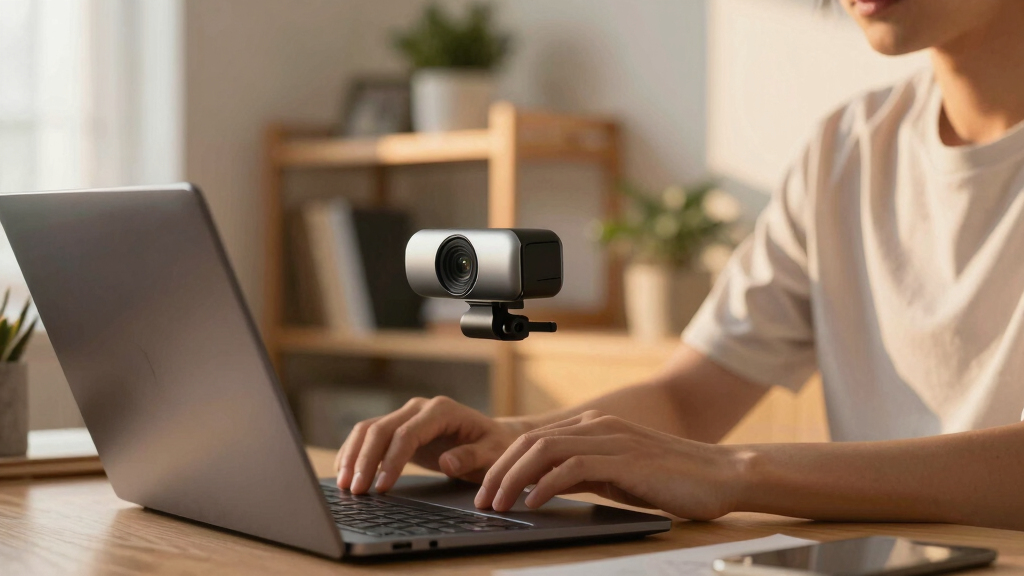

When searching for the best premium conference webcams, you want devices that combine exceptional video quality, reliable audio, and advanced features like auto-tracking and wide angles. The Logitech MX Brio stands out for its 4K resolution and versatile features, making it ideal for high-end professional use. The Owl Labs Meeting Owl 3 offers a unique 360° view and AI-driven tracking, perfect for collaborative environments. Meanwhile, models like the NUROUM C10 provide a solid balance of quality and affordability, but may lack some advanced features. The main tradeoffs typically involve balancing resolution, field of view, and smart features versus cost. Continue reading for a detailed comparison to find the best fit for your needs.

Prime made for students and young adults
- Fast, free delivery for dorm and study essentials
- Prime Video and Amazon Music included
- Member-only deals
Key Takeaways
- Top picks vary based on whether you prioritize resolution, field of view, or smart tracking features.
- The Logitech MX Brio offers the most versatile 4K quality but comes at a higher price point.
- 360° cameras like the Owl Labs Meeting Owl excel in collaborative spaces but may have slightly lower resolution options.
- True premium webcams often include AI auto-tracking and noise-canceling microphones, which significantly enhance remote meeting quality.
- Budget considerations still matter; some high-end features are available at lower prices than expected, but tradeoffs in resolution or tracking may occur.



More Details on Our Top Picks
TONGVEO 3-in-1 4K Webcam with Microphones and Speaker, AI Auto-Tracking, 5X Digital Zoom, Adjustable FOV, Remote Control, Compatible with Microsoft Teams, Zoom, Google Meet
The TONGVEO 4K webcam stands out for delivering ultra HD video with advanced AI auto-framing and voice tracking, making it ideal for professional presentations or content creation where precise focus on the speaker is essential. Compared to the EMEET S600, it offers more versatile FOV options and remote control, but it lacks image stabilization, which could impact stability during movement. Its built-in dual microphones and speaker support clear audio, eliminating the need for external devices in many setups. The plug-and-play USB connection ensures broad compatibility, but the absence of wireless options limits mobility. This model is perfect for users seeking comprehensive features in a single device for high-quality video meetings or streaming, though those prioritizing portability might find it less convenient.
Pros:- Ultra HD 4K video with AI auto-framing and voice tracking
- Built-in dual microphones and speaker for clear audio
- Remote control with adjustable FOV and digital zoom
- Plug-and-play compatibility with major platforms
Cons:- No image stabilization, which may cause shaky footage during movement
- Limited to USB connection, lacking wireless options
Best for: Professionals or streamers needing high-quality 4K video with auto-tracking for dynamic presentations or online teaching
Not ideal for: Users who require wireless connectivity or portable solutions, as the device relies solely on USB and is relatively bulky
- Sensor Type:CMOS
- Resolution:3840×2160 at 30fps
- Lens Type:Zoom
- Digital Zoom:5x
- FOV Modes:118°, 100°, 88°
- Microphones:Dual omnidirectional with noise cancellation
- Connectivity:USB 2.0/3.0
- Compatibility:Windows 7/8/10/11, Mac OS
Bottom line: This is a top choice for users who need a feature-rich, high-resolution webcam with auto-tracking for professional or streaming use.
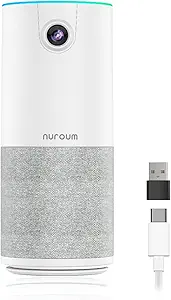
NUROUM C10 (2nd Gen) 1080P Conference Webcam with Microphone and Speaker
The NUROUM C10 (2nd Gen) offers a streamlined solution with 1080P video, a 90° wide-angle lens, and integrated microphone and speaker, making it suitable for small to medium conference rooms. Unlike the Owl Labs Meeting Owl 3, which provides 360° coverage and AI-driven speaker tracking, the C10 focuses on delivering high-quality standard video with automatic light and audio adjustments. Its all-in-one design simplifies setup, but the lack of detailed mounting options and no built-in privacy shutter could be limitations for some users. This webcam is well-suited for teams seeking an easy-to-deploy, budget-conscious device that still offers reliable audio and video, though it might fall short for larger or more complex conference environments.
Pros:- High-quality 1080P video with 90° wide-angle lens
- Integrated microphone and high-fidelity speaker
- Plug-and-play USB connectivity with automatic adjustments
- Compact and easy to set up
Cons:- Lack of detailed mounting options and privacy shutter
- No room for expansion or additional coverage
Best for: Small teams or remote workers requiring a compact, all-in-one webcam with good video and audio quality
Not ideal for: Large conference rooms or hybrid setups needing AI-driven tracking and expansive coverage
- Camera Resolution:1080P@30fps
- Lens:2MP CMOS, 90° wide angle
- Microphone:4-element noise-canceling array
- Speaker:High-fidelity loudspeaker
- Connectivity:USB-C, USB-A adapter included
- Features:Auto low-light adjustment, AGC, touch controls
Bottom line: Ideal for small teams seeking a simple, all-in-one webcam for effective video calls without advanced tracking features.
Owl Labs Meeting Owl 3 – 360° 1080p HD Conference Room Camera with AI-Driven Speaker Tracking and 18-Foot Microphone Pickup
The Meeting Owl 3 excels in delivering comprehensive 360° video and audio for larger or hybrid conference spaces. Its 1080p HD camera captures the entire room, while AI-driven speaker tracking ensures focus on active participants—an advantage over traditional fixed-view webcams like the Logitech C920e. The 18-foot microphone pickup range offers flexibility in room size, but its premium price and potential need for additional units for very large spaces can be drawbacks. Its plug-and-play setup simplifies deployment, and compatibility across platforms makes it adaptable for various meeting environments. This device makes the most sense for organizations seeking an all-encompassing, immersive conference experience, despite the higher cost.
Pros:- 360° video and audio coverage for entire rooms
- AI-driven speaker tracking enhances active speaker focus
- Easy plug-and-play setup with broad platform compatibility
- Expandable with additional devices
Cons:- Higher cost compared to traditional webcams
- Additional units may be needed for very large rooms
- Microphone pickup limited to 18 feet without expansion
Best for: Medium to large conference rooms needing 360° coverage and AI-driven speaker focus
Not ideal for: Small or budget-conscious teams who only need standard video quality or cannot accommodate the premium price
- Video Resolution:1080p HD
- Audio Pickup Range:18 feet
- Field of View:360°
- Speaker Tracking:AI-driven
- Compatibility:Microsoft Teams, Zoom, Google Meet
- Setup:Plug-and-play USB
Bottom line: This is a strong choice for teams wanting immersive, all-in-one room coverage with AI tracking, despite its premium price.
Logitech C920e HD 1080p Webcam with Microphone, Certified for Zoom and Microsoft Teams
The Logitech C920e offers reliable 1080p HD video with a 78° fixed field of view, making it a dependable choice for many professional environments. Compared with the NUROUM C10, it provides a narrower but consistent view, suitable for individual or small group settings. Its automatic light correction and autofocus help maintain clear images across varied lighting conditions, while dual omnidirectional microphones ensure natural audio. The privacy cover adds security, and its adjustable clip allows flexible mounting. However, the fixed FOV limits versatility for wider or more dynamic setups, and it lacks zoom functionality, which could restrict framing options for some users. This webcam is best suited for users who prioritize straightforward, high-quality video for everyday meetings.
Pros:- Full HD 1080p video with automatic light correction
- Dual omnidirectional microphones for natural sound
- Privacy cover for security
- Flexible mounting options
Cons:- Fixed 78° FOV limits wider framing
- No zoom or advanced tracking features
Best for: Remote professionals or teams seeking a proven, reliable webcam for daily video calls with minimal fuss
Not ideal for: Users who need adjustable FOV or advanced features like auto-tracking or 4K resolution
- Resolution:Full HD 1080p
- Field of View:78°
- Microphones:Dual omnidirectional
- Autofocus:Yes
- Light Correction:Automatic
- Privacy Cover:Yes
Bottom line: This webcam is well-suited for professionals who want a dependable, straightforward 1080p camera for daily remote meetings.
EMEET S600 4K Webcam for Streaming with Sony Sensor, Autofocus, Noise-Canceling Mics, Privacy Cover
The EMEET S600 distinguishes itself with a 4K Sony sensor delivering crisp, detailed images suitable for professional streaming and content creation. Compared to the TONGVEO 4K, it offers higher frame rates up to 60FPS at 1080P and features PDAF autofocus for quick, sharp focus. Its noise-canceling microphones and built-in privacy cover add to its appeal for live broadcasting. However, its fixed FOV at 73° can be limiting for more expansive shots, and the lack of image stabilization might cause shaky footage in unstable environments. This pick makes the most sense for streamers or broadcasters prioritizing high-resolution video and fast autofocus, although outdoor or mobile use is not recommended.
Pros:- High-quality 4K resolution with crisp detail
- Fast PDAF autofocus for sharp images
- Built-in noise-canceling microphones
- Privacy cover for security
Cons:- Limited FOV at 73° which restricts wide shots
- No image stabilization for shaky environments
Best for: Content creators or streamers needing high-resolution, fast autofocus, and reliable audio for live broadcasts
Not ideal for: Outdoor or mobile users who need image stabilization or wider FOVs for varied scenes
- Sensor Type:CMOS
- Sensor Size:1/2.55 inch
- Resolution:4K@30FPS, 1080P@60FPS
- Autofocus:PDAF
- Microphones:Noise-canceling
- View Angle:73°
- Connectivity:USB
- Compatibility:Windows 10/11, macOS, Linux, Android TV
Bottom line: This webcam offers excellent clarity and autofocus for content creators focused on high-quality streaming and recording, despite its fixed FOV.
Logitech Brio 101 Full HD 1080p Webcam for Meetings, Streaming, Desktop, Laptop, PC – Built-in Mic, Shutter, Works with Zoom, Microsoft Teams, Nintendo Switch, USB-A, Black
The Logitech Brio 101 stands out for delivering reliable 1080p video with auto light balance, making it ideal for everyday meetings and streaming. Compared to the Logitech C920x, it offers built-in privacy and eco-friendly plastics, though it sacrifices 4K resolution. Its compatibility with Nintendo Switch broadens its appeal beyond traditional PCs, but its USB-A connection may limit use on newer devices without adapters. The privacy shutter adds security, but the absence of higher resolution might be a downside for users seeking ultra-sharp image quality.
Pros:- Reliable 1080p video clarity for meetings and streaming
- Built-in microphone ensures clear audio
- Privacy shutter enhances security
- Made with 77% post-consumer recycled plastic
Cons:- Limited to USB-A connection, may need adapters for newer ports
- No 4K recording or streaming support
Best for: Eco-minded professionals or casual users who need dependable 1080p video for meetings and streaming.
Not ideal for: Power users or content creators requiring 4K resolution or advanced controls, as this webcam lacks those features.
- Resolution:Full HD 1080p
- Compatibility:Windows, Mac, Nintendo Switch
- Connectivity:USB-A
- Built-in Microphone:Yes
- Privacy Shutter:Yes
- Material:77% post-consumer recycled plastic
Bottom line: This webcam suits users who prioritize eco-friendliness and reliable HD quality over ultra-high resolution features.
Logitech C920x HD Pro PC Webcam, Full HD 1080p/30fps, Clear Audio, HD Light Correction, Compatible with Microsoft Teams, Google Meet, Zoom, Nintendo Switch, Mac, Tablet
The Logitech C920x offers crisp 1080p footage at 30fps with automatic light correction, making it a reliable choice for varied lighting conditions. Unlike the Brio 101, it doesn’t have a privacy shutter but compensates with autofocus and a included background editing license via XSplit VCam. While it lacks 4K support, its dual microphones deliver clear stereo sound, and its compatibility with tablets and Nintendo Switch broadens its use cases. The absence of a privacy shutter could be a concern for security-minded users.
Pros:- Auto light correction for consistent image quality
- Autofocus ensures sharp images
- Includes background editing software
- Compatible with a wide range of platforms
Cons:- No built-in privacy shutter for physical security
- Limited to 30fps at 1080p, less smooth for fast motion
Best for: Professionals and educators seeking clear video with automatic lighting adjustments across multiple platforms.
Not ideal for: Streamers or high-end content creators needing higher frame rates or 4K resolution, as this model maxes out at 30fps.
- Resolution:Full HD 1080p
- Frame rate:30 fps
- Light correction:HD Light Correction
- Autofocus:Yes
- Audio:Stereo with dual mics
- Includes:3-month XSplit VCam license
Bottom line: This webcam excels for users who need dependable auto-adjusting video across multiple devices without the need for ultra-high resolution.
Logitech MX Brio Ultra HD 4K Webcam for Collaboration and Streaming
The Logitech MX Brio elevates video quality with 4K resolution, making it suitable for professional streaming and detailed meetings. Its AI-enhanced image processing and adjustable settings outperform the Brio 101 in clarity and customization, though it comes with a higher price tag. The inclusion of noise-reducing microphones and a privacy shutter makes it well-suited for secure, high-quality communication. However, its USB-C connection and complex controls might pose a learning curve, especially for less tech-savvy users.
Pros:- Stunning 4K video with AI-enhanced clarity
- Customizable controls for optimal image settings
- Effective noise reduction microphones
- Privacy shutter for security
Cons:- Premium price may be prohibitive for some
- Requires USB-C port, possibly necessitating adapters
Best for: High-end content creators, marketers, or executives who need exceptional video quality and advanced features.
Not ideal for: Budget-conscious buyers or users with older devices lacking USB-C ports, due to its premium price and connectivity requirements.
- Resolution:4K at 30fps, 1080p at 60fps
- Sensor:Advanced with larger pixels
- Connectivity:USB-C
- Features:AI image enhancement, auto-exposure, noise reduction
- Microphones:Dual beamforming noise-reducing
- Privacy Cover:Yes
Bottom line: This webcam fits those who require the highest video quality and advanced controls for professional-grade streaming or collaboration.
Logitech Brio 4K Webcam with HDR, Noise-Canceling Microphone, and Windows Hello
The Logitech Brio 4K offers exceptional Ultra HD video with HDR and flexible field-of-view options, perfect for detailed presentations or high-end conferencing. Its support for Windows Hello facial recognition adds a layer of security and convenience, surpassing the MX Brio in biometric login capabilities. The noise-canceling microphones ensure clear audio, but the higher price and USB 3.0 requirement may limit accessibility for some users. Its auto light correction and multiple view presets cater well to professional settings demanding crisp visuals.
Pros:- Excellent 4K video with HDR support
- Windows Hello facial recognition for secure login
- Multiple field-of-view presets
- Noise-canceling microphones for clear audio
Cons:- Higher price compared to standard webcams
- Requires USB 3.0 for optimal performance
Best for: Executives or professionals who need high-resolution video with biometric security features and flexible framing options.
Not ideal for: Casual users or those with older computers lacking USB 3.0 ports, due to price and connectivity constraints.
- Resolution:Up to 4K at 30 fps
- Field of View:65°, 78°, 90°
- Microphone:Dual noise-canceling
- Light Correction:RightLight 3
- Windows Hello:Yes
- Compatibility:Windows, Mac, ChromeOS
Bottom line: Ideal for security-conscious professionals seeking premium 4K video with biometric login features.
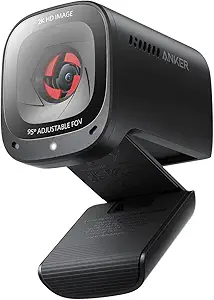
Anker PowerConf C200 2K Webcam for PC, Laptop, Mac
The Anker PowerConf C200 delivers crisp 2K resolution with adjustable viewing angles, making it a strong choice for detailed meetings and streaming. Compared to the Brio 101 and C920x, it offers better image resolution and flexible framing, though it lacks image stabilization and requires software for angle adjustments. Its AI noise-canceling microphones and built-in privacy cover enhance security and audio clarity, making it well-suited for professional environments that demand sharp visuals and reliable audio without the expense of 4K.
Pros:- Sharp 2K video resolution for detailed images
- Effective low-light correction
- Adjustable field of view for versatile framing
- Built-in privacy cover for security
Cons:- Requires software for angle adjustment
- Limited to USB connection without image stabilization
Best for: Professionals needing high-quality 2K video with flexible framing in a portable design.
Not ideal for: Those who prefer plug-and-play simplicity or require 4K resolution, as this model requires software setup for angle adjustments.
- Resolution:2K Ultra-Clear
- Field of View:65°, 78°, or 95°
- Microphones:Dual AI Noise Canceling Mics
- Low-Light Performance:Yes
- Privacy Cover:Yes
- Connectivity:USB
Bottom line: This webcam suits users seeking high-quality 2K video with flexible framing options and built-in security features.
How We Picked
I evaluated these webcams based on several criteria that matter most for premium conference setups. Performance was assessed by video resolution, frame rate, and audio quality, ensuring clear, smooth visuals and sound. Usability factors like setup simplicity, compatibility with common conferencing platforms, and smart features such as auto-tracking or wide-angle views also played a key role. Build quality and durability influenced my choices, as well as overall value considering price relative to features offered. The ranking reflects a balance between cutting-edge features, reliability, and user experience, leaning toward models that elevate professional meetings while avoiding overly niche or niche-only solutions.Factors to Consider When Choosing Best Premium Conference Webcams
Choosing the best premium conference webcam involves weighing several key factors. While high resolution and audio clarity are essential, features like auto-tracking, field of view, and ease of use can transform a good device into a great one. It’s important to consider your specific environment—whether a small office or a large conference room—and your primary use cases, such as streaming, professional meetings, or collaboration. Investing in a webcam with robust build quality and software support ensures long-term satisfaction. Keep in mind that premium models often come with a higher price tag, but the added features can significantly improve your remote communication experience.Resolution and Video Quality
Higher resolution webcams, like 4K models, provide sharper, more detailed images that impress clients and colleagues alike. However, 4K often requires more bandwidth and processing power, which could affect performance on lower-spec systems. For most professional settings, Full HD (1080p) remains a reliable standard, offering a good balance of quality and compatibility. When choosing, consider whether your conferencing platform supports 4K streaming and if your hardware can handle it without lag. Keep in mind that resolution alone isn’t enough—frame rate and sensor quality also impact video smoothness and clarity.
Field of View and Auto-Tracking
Wide-angle lenses and auto-tracking features are game-changers in larger or collaborative spaces. A broader field of view allows more of the room to be captured, reducing the need for multiple cameras. AI-driven auto-tracking actively follows speakers, ensuring they remain centered and clear during meetings. However, these features can add complexity and cost, and sometimes auto-tracking may misfire or struggle in crowded environments. Decide if your setup benefits from a fixed wide-angle camera or one that dynamically adjusts focus based on movement.
Audio Quality and Microphone Capabilities
Clear audio is just as important as sharp video, especially in remote meetings. Many premium webcams include noise-canceling microphones designed to pick up voices while reducing background noise. Some models feature multiple microphones or 360° pickup patterns, which are advantageous in group settings. Consider whether integrated microphones meet your needs or if you should pair the webcam with an external audio device for superior sound. Remember, poor audio quality can undermine even the best video, so prioritizing microphones is a smart move.
Ease of Use and Compatibility
A premium webcam should be simple to set up and compatible across various platforms like Zoom, Microsoft Teams, and Google Meet. USB connectivity remains standard, but check if the device supports your operating system and hardware. Features like remote control, adjustable mounts, and user-friendly software can make daily use more seamless. Avoid overly complex setups or proprietary software that might hinder quick deployment or updates. Compatibility and ease of use are critical for ensuring the webcam integrates smoothly into your existing workflow.
Build Quality and Long-Term Reliability
Premium devices should feel sturdy and well-made, with attention to cable management and mounting options. A durable webcam reduces the risk of damage and ensures consistent performance over years of use. Look for models with quality sensors, robust construction, and good warranty support. Additionally, consider software updates and customer support, as these can extend the lifespan of your investment. A webcam that feels fragile or is difficult to maintain could end up costing more in repairs or replacements down the line.
Frequently Asked Questions
Do I really need 4K resolution for my conference webcam?
While 4K resolution offers the sharpest images, it isn’t always necessary for every professional setting. If your meetings are primarily internal or in smaller groups, Full HD (1080p) often suffices and requires less bandwidth and processing power. However, for high-stakes presentations, client-facing meetings, or streaming, 4K can add a level of clarity that enhances your professional image. Consider your hardware capabilities and platform support before opting for 4K, as it can sometimes introduce complications if not supported properly.
Is auto-tracking worth the extra cost in a premium webcam?
Auto-tracking can significantly improve the dynamics of a meeting, especially in larger rooms or when multiple speakers are involved. It allows the camera to follow movement, keeping participants framed without manual adjustments. However, auto-tracking systems sometimes misfire or struggle in crowded environments, which could be distracting. If your meetings involve a lot of movement or you’re hosting large, collaborative sessions, investing in auto-tracking adds value. For smaller, fixed setups, a standard wide-angle or fixed-focus camera might be more reliable and cost-effective.
Should I prioritize wide-angle lenses or auto-focus features?
Wide-angle lenses are beneficial for capturing entire rooms or large groups, reducing the need for multiple cameras. Auto-focus ensures sharp images regardless of subject movement or distance from the camera. The best choice depends on your typical setup: if you often host large meetings or presentations, a wide-angle lens is advantageous. Conversely, auto-focus is essential if your environment varies in distance or if you need to switch between close-up and distant shots frequently. Many premium webcams combine both features for maximum flexibility.
How important is microphone quality in a premium conference webcam?
Microphone quality is often underestimated but is vital for clear, professional communication. Built-in noise-canceling microphones improve clarity and reduce background noise, which is especially critical in noisy environments. Multiple microphones or 360° pickup patterns can enhance audio in group settings, making everyone’s voice heard clearly. High-quality microphones can eliminate the need for external audio equipment, simplifying your setup while maintaining a professional sound quality. Investing in good audio is just as important as investing in high-resolution video.
Can I rely solely on a webcam for professional video calls?
While a high-quality webcam forms the core of a professional video setup, it’s often best to complement it with good lighting and external audio devices. Proper lighting ensures your face is well-lit and free of shadows, enhancing the image quality even further. External microphones or speakers can greatly improve sound clarity, especially in larger rooms or noisy environments. Relying solely on the webcam’s built-in features might not deliver the same polished appearance and sound, so a combined approach often yields the best results for high-stakes meetings or streaming.
Conclusion
The best overall premium conference webcam for most users is the Logitech MX Brio, thanks to its 4K resolution, versatile features, and reliable performance. For those seeking a unique meeting experience, the Owl Labs Meeting Owl 3 delivers a 360° view with AI tracking, ideal for collaborative workspaces. Budget-conscious buyers who still want premium quality might consider the NUROUM C10, which balances price and performance. Beginners should look at models like the Logitech C920x for straightforward setup. For specialized needs like large rooms or streaming, the Logitech Brio 4K or Embrace S600 will serve best. Your choice should reflect your environment, meeting style, and budget, ensuring you get a device that enhances your remote communication seamlessly.
Halloween Picks

Kalolary 12ft Halloween Witch Haunted House Inflatable Archway

Panefright Halloween Window Projector – Scary Projector for Spooky Decor

Haunted Hill Farm 2-Ft. Zombie Raccoon Halloween Animatronic
As an affiliate, we earn on qualifying purchases.